


What is OBD2? How on-board diagnostics works
If the Check Engine Light comes on, the first useful question is not necessarily “which part should I replace?” It is “what did the vehicle detect?”
That is where OBD2 comes in. OBD2, short for On-Board Diagnostics II, is the standardized diagnostic system used by modern vehicles to monitor emissions-related operation and make diagnostic information available to compatible scan tools.
Through the vehicle’s diagnostic connector, a scanner can retrieve fault codes, live sensor values, freeze-frame information, readiness monitor status and other data reported by the vehicle.
More advanced diagnostic equipment can go further. Depending on the vehicle and the tool being used, it may also communicate with systems such as ABS, airbags, transmission, electronic parking brake or body-control modules. Those capabilities go beyond the basic standardized OBD2 functions, but they often use the same physical diagnostic connector.
OBD2 in simple terms:
The vehicle detects an abnormal condition → the control unit stores diagnostic information → a scanner connects through the diagnostic port → the technician or vehicle owner reads the information and uses it as a starting point for diagnosis.
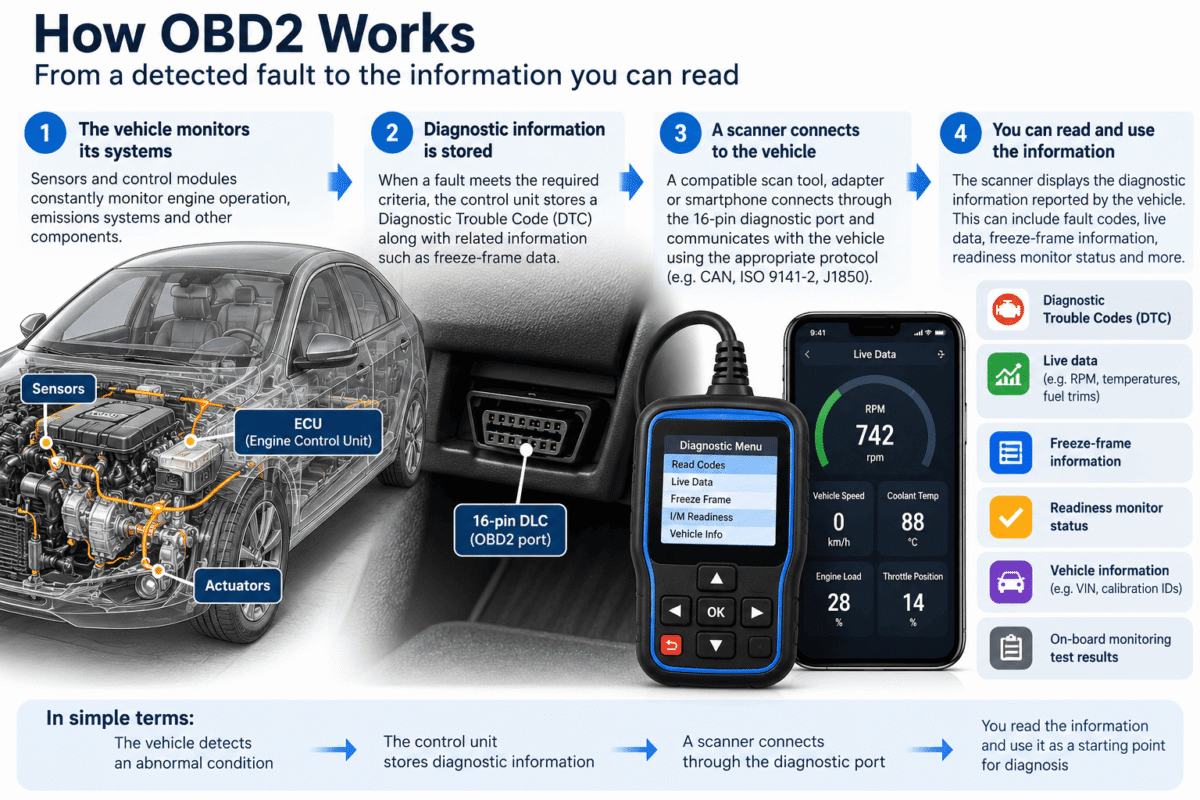
How OBD2 works in a real vehicle
A modern vehicle constantly monitors information coming from sensors, actuators and electronic control systems. The engine control system compares this information with the operating conditions it expects to see.
When a fault meets the required diagnostic criteria, the vehicle may store a Diagnostic Trouble Code (DTC). Depending on the type of fault, it can also illuminate the Check Engine Light, record the conditions present when the fault occurred, change the status of an emissions readiness monitor or use a fallback operating strategy.
The important distinction is that OBD2 records what the control system detected. It does not automatically tell you which part should be replaced.
For example, a fault associated with a sensor does not necessarily prove that the sensor itself has failed. The cause may instead be wiring, a connector, incorrect power or ground, a mechanical problem affecting the reading or another fault elsewhere in the system.
That is why a fault code should normally be treated as the beginning of the diagnostic process, not the final answer.
What can you actually read with OBD2?
The exact information available depends on the vehicle, the diagnostic protocol and the scan tool. Standard emissions-related OBD2 functions can include:
- stored diagnostic trouble codes;
- pending diagnostic trouble codes;
- permanent diagnostic trouble codes where supported;
- Check Engine Light status;
- freeze-frame information;
- live engine data;
- emissions readiness monitor status;
- vehicle identification information;
- on-board monitoring test results.
Some of this information is useful even when there is no obvious fault.
Live data, for example, lets you observe values reported by the vehicle while the ignition is on or the engine is running. Depending on the vehicle, this may include engine RPM, road speed, coolant temperature, engine load, throttle position, intake-air temperature, fuel trims, oxygen-sensor information, airflow, manifold pressure and ignition timing data.
This is also why a compatible OBD2 adapter and smartphone application can work as a simple digital dashboard. The adapter retrieves the information made available by the vehicle, while the application displays values such as RPM, speed, engine load or coolant temperature in real time.
Engine RPM is one of the commonly available standard OBD2 parameters, so it can normally be displayed on a smartphone, tablet, laptop, dedicated scanner or aftermarket OBD2 display when the vehicle and interface support it.
Freeze-frame data
Freeze-frame information is particularly useful when investigating an intermittent fault. It records selected operating conditions associated with an emissions-related DTC.
Depending on the vehicle, the snapshot may include engine RPM, vehicle speed, coolant temperature, engine load, fuel trims and other available parameters.
Instead of knowing only that a code was stored, you may therefore be able to see whether the vehicle was idling, accelerating, travelling at speed or operating under another specific condition when the fault was detected.
Readiness monitors
Readiness monitors are self-tests performed by the vehicle’s emissions control system. Typical monitors can include misfire, fuel system, catalyst, oxygen sensors, oxygen-sensor heaters, EVAP and EGR where equipped.
When diagnostic information is cleared, or after some types of power interruption, certain monitors may return to an incomplete state. The vehicle then has to encounter the required operating conditions before those tests can run again.
Where is the OBD2 port?
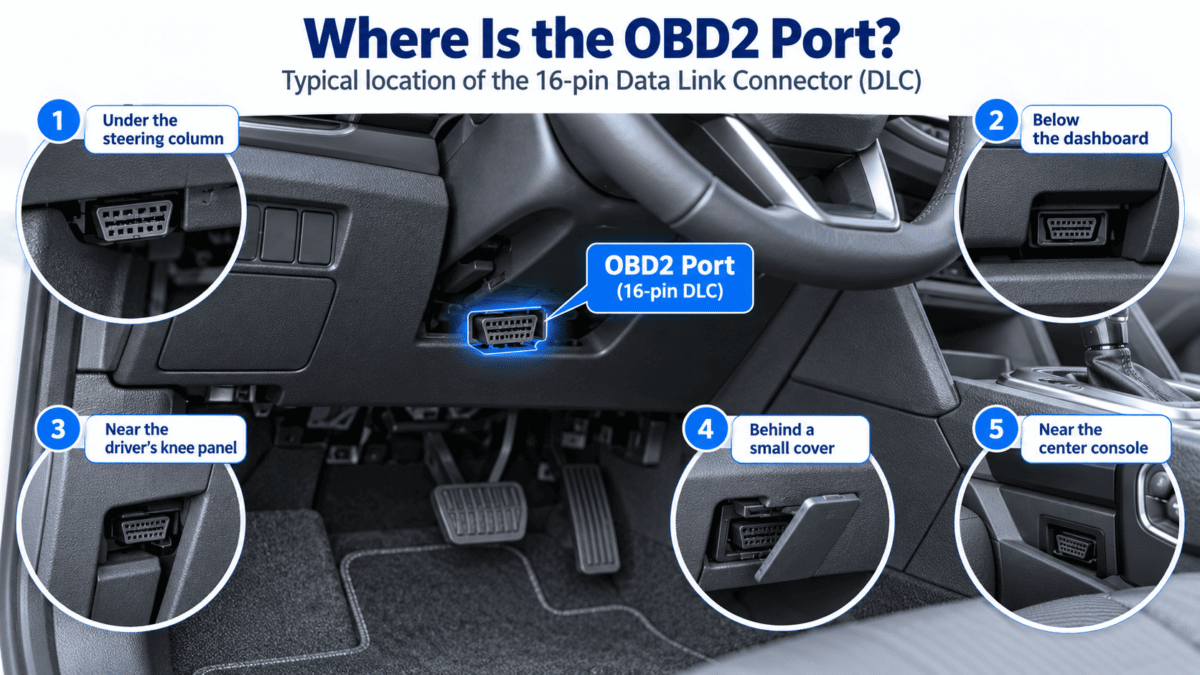
OBD2 vehicles commonly use a standardized 16-pin Data Link Connector, usually abbreviated as DLC.
The connector is normally located inside the passenger compartment and within reach of the driver’s seating position. Depending on the vehicle, you may find it:
- under the steering column;
- below the dashboard;
- near the driver’s knee panel;
- behind a small dashboard cover;
- near the center console.
The shape of the connector is standardized, although the electrical pins used by a particular vehicle can vary according to its diagnostic communication system.
For a closer look at the connector itself, see our OBD2 connector and 16-pin DLC pinout guide.
Understanding OBD2 trouble codes
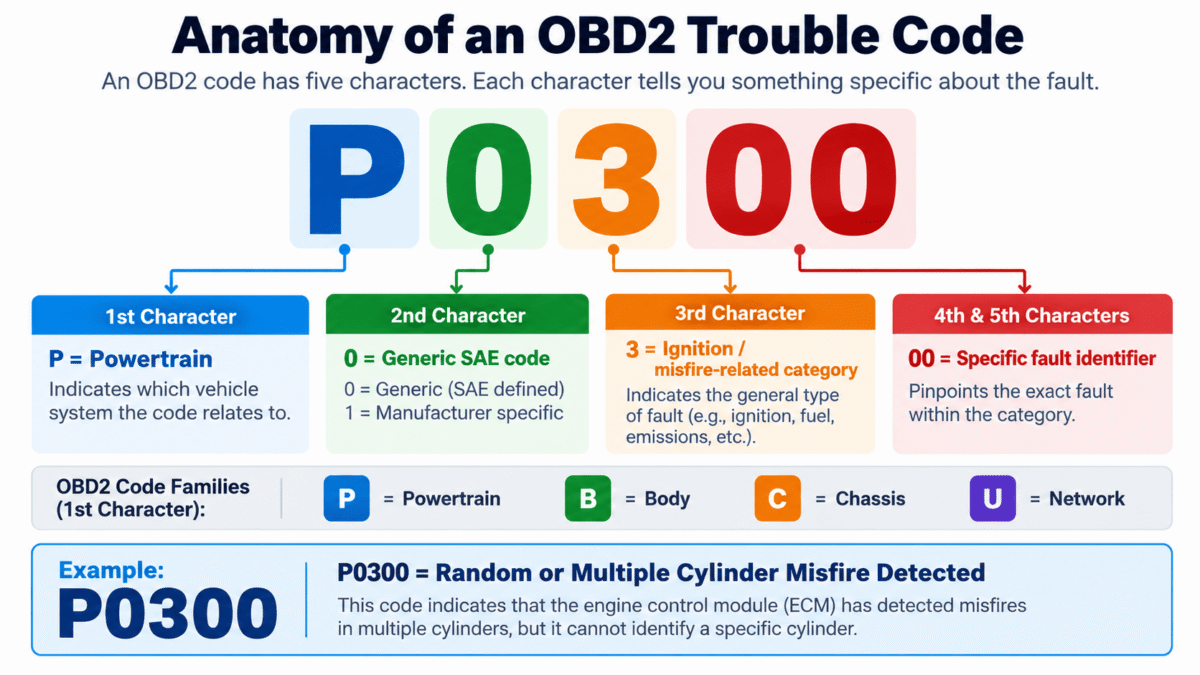
A Diagnostic Trouble Code, or DTC, is an identifier stored when the control system detects a particular type of fault.
Examples include:
- P0300 — random or multiple cylinder misfire detected;
- P0420 — catalyst system efficiency below threshold;
- P0171 — system too lean;
- U0100 — lost communication with engine or powertrain control module.
The first character identifies the broad family of the code:
- P — Powertrain;
- B — Body;
- C — Chassis;
- U — Network communication.
The code gives you a direction. It tells you which diagnostic condition was detected and which area deserves attention. What it usually does not do is prove that one particular component has failed.
Take a sensor-related DTC as an example. The sensor itself may indeed be defective, but the same code could also be associated with damaged wiring, a poor connector, incorrect power or ground, a mechanical issue affecting the reading or another control-system fault.
This is one of the most important things to understand about vehicle diagnostics: reading the code and diagnosing the cause are not the same thing.
You can look up individual codes in our OBD2 DTC Code Library.
Clearing fault codes: what it does — and what it does not do
A compatible scanner can normally request that emissions-related diagnostic information be cleared. When the system permits it, this can also switch off the Check Engine Light.
But clearing the memory is not a repair.
If the condition that caused the fault is still present, the control unit may detect it again the next time the relevant diagnostic test runs. The DTC can then return and the warning light may illuminate again.
Clearing diagnostic information can also affect readiness monitor status. For that reason, simply erasing every code before understanding the fault can remove useful diagnostic information and reset tests that had already completed.
A better approach is to read the codes and supporting information first, understand what the vehicle has reported and then decide what testing is actually required.
From a basic code reader to a professional diagnostic tool
Not every device plugged into an OBD2 connector has the same capabilities.
Basic OBD2 code readers
A basic code reader is mainly designed for standardized emissions-related engine diagnostics. It can typically retrieve and clear generic DTCs and may provide some live data and readiness information.
Bluetooth, Wi-Fi and USB adapters
These interfaces connect the vehicle to software running on a smartphone, tablet or computer.
They are commonly used for reading fault codes, displaying live data, monitoring RPM and temperatures, viewing fuel trims, checking readiness monitors and building customizable digital dashboards.
One familiar name in this category is ELM327. ELM327-type adapters are widely used as an inexpensive bridge between a vehicle and diagnostic software.
However, devices sold under the generic ELM327 description are not necessarily identical. Adapter quality, hardware and protocol implementation can vary, so compatibility and reliability can differ significantly from one interface to another.
Professional and multi-system scanners
More advanced diagnostic tools can communicate using manufacturer-specific functions in addition to basic generic OBD2.
Depending on the vehicle and scanner, this can include:
- ABS diagnosis;
- airbag/SRS diagnosis;
- transmission diagnostics;
- service resets;
- electronic parking brake functions;
- active tests;
- coding or adaptations;
- injector coding;
- DPF functions.
This difference explains why two scanners plugged into the same 16-pin port can offer completely different levels of access.
See our diagnostic tools and OBD2 scanners.
OBD2 is not the same thing as CAN bus
This distinction is easy to miss because modern OBD2 diagnostics frequently use CAN communication.
OBD2 describes the standardized diagnostic system and the services used to retrieve emissions-related information.
CAN is a communication network technology used inside vehicles.
An OBD2 diagnostic message can therefore travel over CAN, but that does not make every CAN message an OBD2 message. A vehicle may contain several networks carrying information between control modules that has nothing to do with standardized OBD2 diagnostics.
OBD2 has also used several communication technologies over time, including:
- SAE J1850;
- ISO 9141-2;
- ISO 14230 / K-Line;
- ISO 15765-4 CAN.
Modern vehicles predominantly use CAN-based communication for standardized OBD functions.
OBD, OBD2 and EOBD
OBD is the broad term for on-board diagnostics.
OBD2 refers to the standardized second-generation system widely used for emissions-related vehicle diagnostics.
In Europe, the corresponding implementation is commonly referred to as EOBD.
The terminology is often used loosely in everyday conversation, particularly because the same diagnostic tools and 16-pin connector are familiar across many markets.
For a more detailed explanation, see OBD vs OBD2 vs EOBD: What’s the Difference?
Where standard OBD2 stops
OBD2 is extremely useful, but it is important to understand its limits.
Generic OBD2 is primarily concerned with standardized emissions and powertrain diagnostic information. It does not automatically provide access to every electronic module in the vehicle.
Systems such as ABS, SRS/airbag, body control and many manufacturer-specific functions normally require additional diagnostic communication supported by a more capable tool.
A multi-system scanner may still reach those modules through the same physical connector, but the communication taking place is no longer limited to basic generic OBD2 functions.
The same distinction applies to programming. Reading fault codes and reprogramming a control unit are two very different operations.
Professional ECU reprogramming can use systems such as SAE J2534 Pass-Thru, where compatible manufacturer software communicates with the vehicle through a suitable interface.
See our J2534 Pass-Thru programming guide for more information.
What OBD2 cannot tell you
A scan result is diagnostic evidence, not an automatic repair instruction.
OBD2 alone cannot:
- prove which component should be replaced;
- identify every mechanical fault;
- guarantee access to every control module;
- replace electrical testing;
- replace mechanical inspection;
- provide every manufacturer-specific function.
Correct diagnosis often combines several pieces of information: fault codes, live data, freeze-frame information, wiring information, vehicle history and physical testing.
That is also why the cheapest scanner and the most advanced professional tool can both be useful. The right tool depends on the question you are trying to answer.
Frequently asked questions
Can I use OBD2 with my phone?
Yes. A compatible Bluetooth or Wi-Fi OBD2 interface can transmit diagnostic information and live vehicle data to a smartphone application.
Will OBD2 tell me why the check engine light is on?
It can retrieve the diagnostic trouble codes and supporting data associated with the warning. Those codes identify the condition detected by the vehicle, but further testing may still be required to determine the root cause.
Does every OBD2 scanner do the same thing?
No. Basic readers may only provide generic engine diagnostics, while more advanced scanners can communicate with additional modules and manufacturer-specific systems.
Can an OBD2 scanner damage a car?
Routine reading of diagnostic information using compatible equipment is generally non-invasive. More advanced operations such as programming, coding, active tests, wiring modifications or electrical probing should only be performed when their effects are understood.
Related OBD2 guides
- OBD2 Connector & 16-Pin DLC Pinout
- OBD2 Diagnostic Trouble Code Library
- OBD vs OBD2 vs EOBD
- J2534 Pass-Thru Programming
- Diagnostic Tools & OBD2 Scanners
Technical reference
Standardized emissions-related OBD communication between vehicles and external test equipment is defined through standards including SAE J1979 / ISO 15031-5.
OBD2.com and automotive diagnostics
OBD2.com has been associated with automotive diagnostics since the early OBD-II era. The domain was historically used by EASE Simulation / EASE Diagnostics before beginning a new chapter under independent ownership.
If you are interested in the background of the domain, read the history of OBD2.com and EASE Diagnostics.
