


OBD2 PC scan tool software: computer-based vehicle diagnostics
Long before smartphone diagnostic apps became common, one of the most capable ways to work with an OBD2 vehicle was to connect it to a Windows PC or laptop.
The idea was simple: instead of putting the screen, processor, storage and controls inside a dedicated handheld scanner, the vehicle interface handled communication while the computer did the heavy lifting.
That approach offered some real advantages. A laptop could display several live parameters at once, record a long road test, create graphs, store previous diagnostic sessions and generate reports that were much harder to manage on a small handheld tool.
Historical versions of OBD2.com contained extensive information about EASE Diagnostics PC-based scan tools. This page keeps the useful technical concepts behind those systems while explaining how computer-based OBD2 diagnostics fit into the modern diagnostic landscape.
Vehicle diagnostic connector → compatible interface → USB, serial or wireless connection → diagnostic software running on a computer.
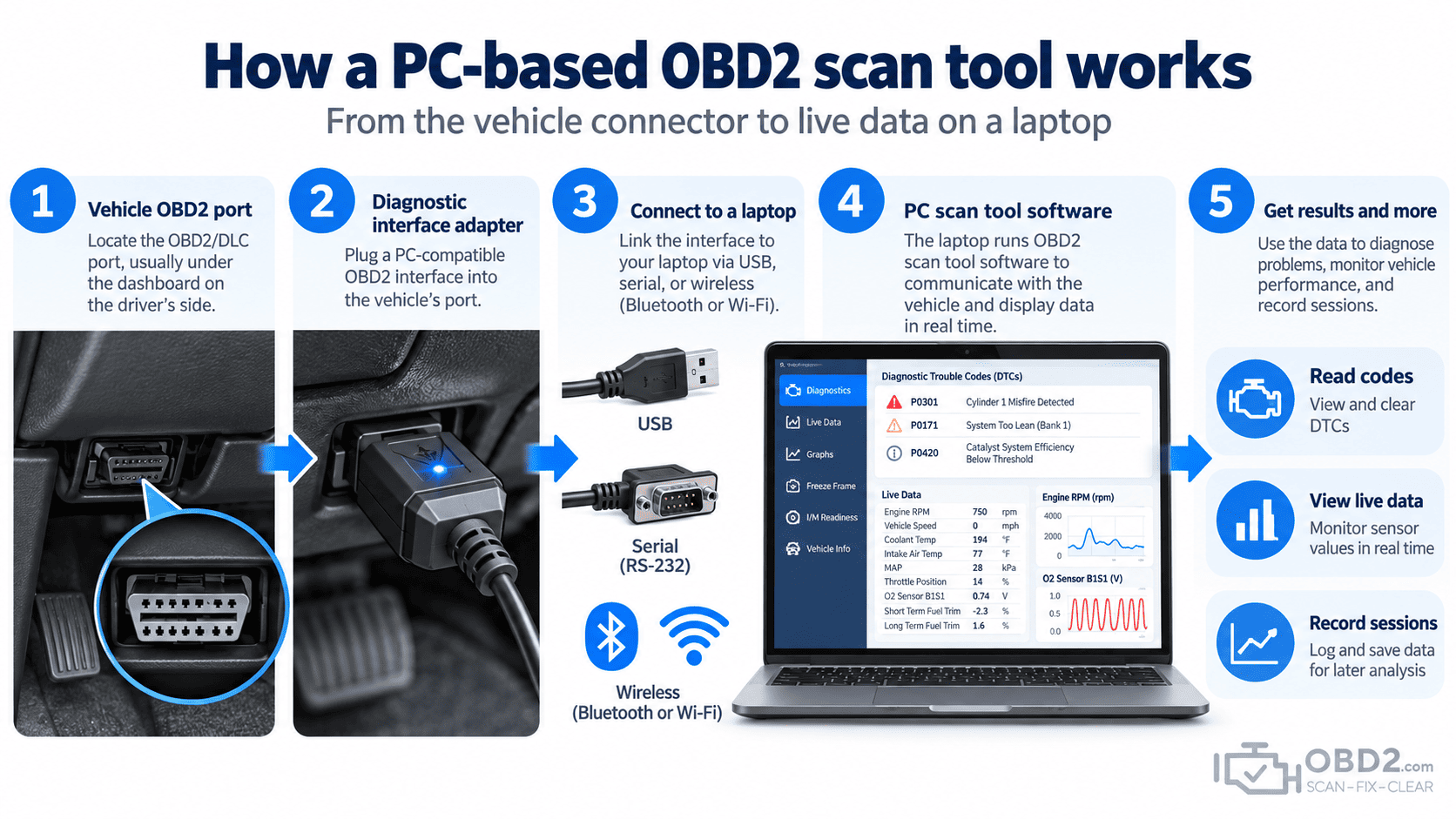
How a PC-based OBD2 scan tool works
A computer cannot normally communicate directly with a vehicle just because it has a USB port.
An interface is required between the PC and the vehicle diagnostic network. That interface handles the electrical signalling and translates communication between the software and protocols used by the car.
Once connected, the diagnostic application can request information from the vehicle and display it on the computer.
Depending on the hardware, software and vehicle, a PC-based diagnostic system can provide access to:
- diagnostic trouble codes, pending codes and freeze-frame data;
- live engine parameters such as RPM, coolant temperature, load and fuel trims;
- readiness monitor status and vehicle identification data;
- graphs, recordings and saved diagnostic sessions;
- manufacturer-enhanced information when supported by the software and interface.
The last point is important because not every PC diagnostic application has the same level of vehicle access.
Generic OBD2 and enhanced diagnostics are not the same thing
Generic OBD2 is standardized primarily around emissions-related engine and powertrain information.
A basic application may therefore work with many different vehicle brands while still showing only a relatively small part of what is available inside the car.
Manufacturer-enhanced diagnostics go further. With suitable hardware and software, a PC system may access additional data, manufacturer-specific fault codes or other control modules.
This is the same distinction you see with modern handheld scanners: two tools can plug into the same 16-pin connector yet provide completely different levels of diagnostic access.
Why live data is more useful on a large screen
One of the strongest arguments for computer-based diagnostics has always been live-data analysis.
A basic scanner can show coolant temperature or fuel trim as a number. A PC can display those values alongside RPM, engine load, throttle position and oxygen-sensor activity, then graph them over time.
That changes how a fault can be investigated.
Imagine a hesitation that only occurs during moderate acceleration. Looking at one parameter at a time may reveal very little. Recording airflow, throttle position, engine load, fuel trims and RPM together can make the event much easier to understand when reviewed afterwards.
Typical standardized data can include engine speed, vehicle speed, coolant and intake-air temperature, throttle position, engine load, fuel trims, oxygen or air/fuel sensor information, manifold pressure, mass airflow and ignition timing.
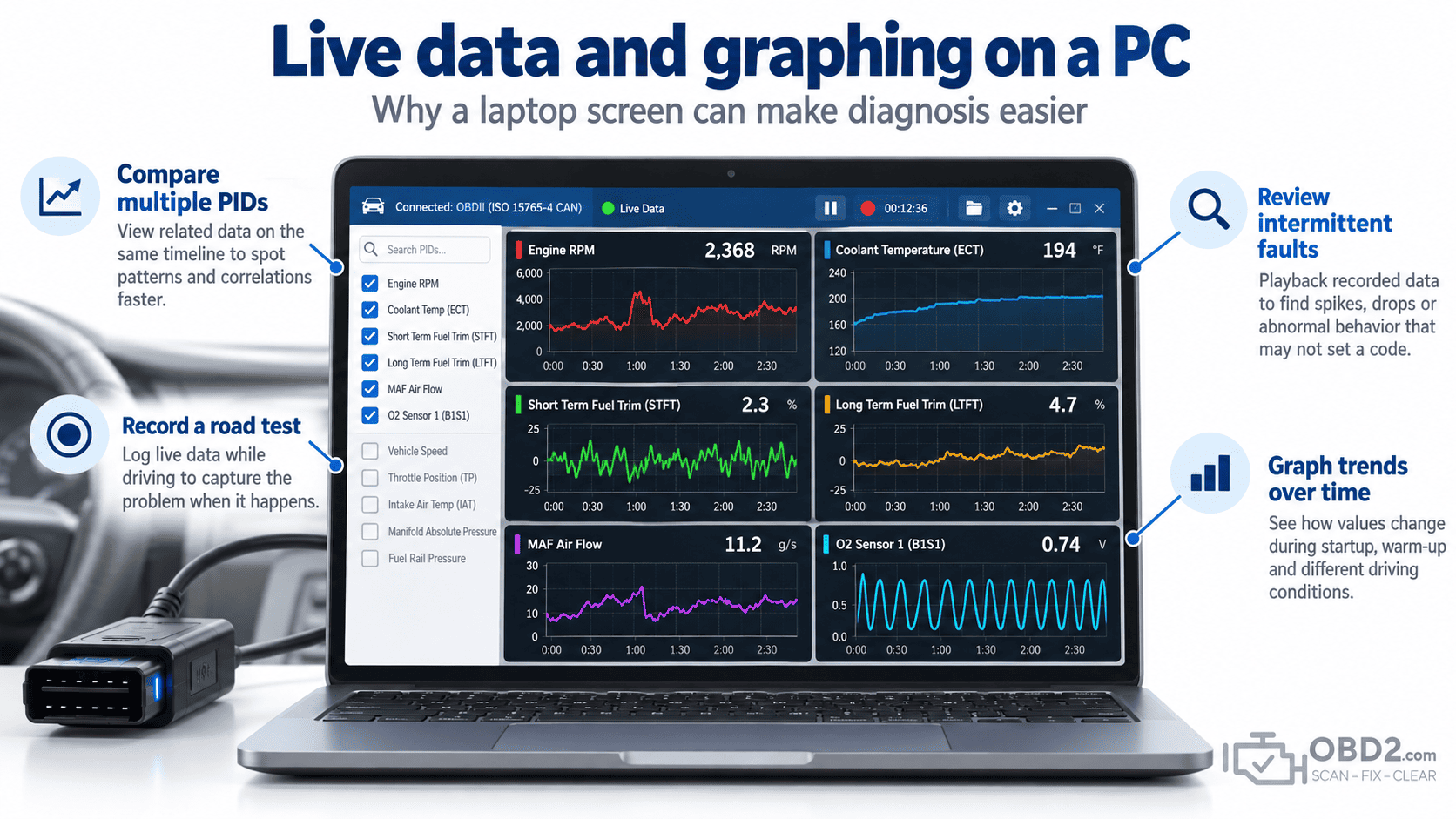
Recording a road test for later analysis
Data logging is another area where PC-based diagnostics made a big difference.
An intermittent problem is difficult to diagnose when it disappears as soon as the vehicle reaches the workshop. If the software can record data while the fault occurs on the road, the technician can analyse the event afterwards without trying to watch a screen while driving.
This is particularly useful for problems that only occur under acceleration, after a cold start, once the engine is hot, at motorway speed or under a specific engine load.
The challenge is not simply recording more data. A good diagnostic session records the parameters that are actually relevant to the fault.
Logging dozens of unrelated PIDs can create a large file without producing a useful answer.
The interface matters as much as the software
The diagnostic program on the laptop is only one part of the system.
The interface determines which vehicle networks can actually be reached, how reliably data is transferred and, in many cases, which advanced features are available.
Over the years, PC diagnostic interfaces have used RS-232 serial connections, USB, Bluetooth, Wi-Fi and other communication methods.
On the vehicle side, OBD2 has used several communication standards. A capable interface may therefore need to support:
- ISO 15765 CAN;
- ISO 9141-2 and ISO 14230 / KWP2000;
- SAE J1850 PWM and VPW;
- additional manufacturer-specific networks when enhanced diagnostics are required.
Modern passenger vehicles predominantly use CAN for standardized OBD2 communication, but older protocol support remains important when diagnosing earlier vehicles.
Can you connect a laptop directly to the OBD2 port?
Normally, no.
A plain USB cable does not automatically provide the electronics required to communicate with the vehicle.
The adapter or interface has to deal with the physical and communication requirements of the diagnostic network.
This is why a USB-to-OBD cable may look simple from the outside while containing electronics inside the connector body.
Where ELM327 fits into PC diagnostics
ELM327-type interfaces made computer-based OBD2 diagnostics much more accessible.
Instead of purchasing a complete proprietary scan system, users could connect a relatively inexpensive interface to a computer and run compatible software.
The same concept later became extremely popular with smartphones.
However, an inexpensive generic ELM327 adapter should not automatically be considered equivalent to an older professional PC diagnostic system.
Differences can exist in communication speed, supported protocols, reliability, buffering, manufacturer-enhanced functions and software integration.
Adapter quality also varies considerably. Two devices sold under the same generic ELM327 description may behave very differently in practice.
PC scan tool or handheld scanner?
Neither architecture is automatically better for every job.
A PC gives you a large display, keyboard, file storage and excellent graphing capability. That can be ideal for detailed analysis, long recording sessions or technical work where multiple data streams need to be compared.
A dedicated scanner is usually easier to carry around a workshop, starts quickly and is designed specifically for automotive use.
Modern professional scanners have also closed much of the gap by offering large touchscreens, graphing, cloud reports and extensive storage without requiring a separate laptop.
The decision is therefore less about which format is “best” and more about what diagnostic job needs to be done.
What a PC scan tool cannot automatically do
Using a computer does not remove the limits of generic OBD2.
Standard OBD2 does not provide universal access to ABS, airbags, body modules, electronic parking brakes or every transmission function.
A PC application can only access these systems when the software and vehicle interface support the required manufacturer-specific communication.
The same applies to ECU programming. Reading codes and live data is not the same operation as rewriting module software.
Programming may require dedicated manufacturer software and an interface such as a compatible J2534 Pass-Thru device.
Clearing a code is not repairing the vehicle
Compatible PC software can normally request that standardized emissions-related DTCs be cleared.
This can switch off the Check Engine Light when the vehicle accepts the request, but it does not fix whatever caused the code to appear.
If the fault remains present, the control module can detect it again and store the DTC again.
Clearing codes may also reset readiness information, which is another reason to record and understand the diagnostic information before erasing it.
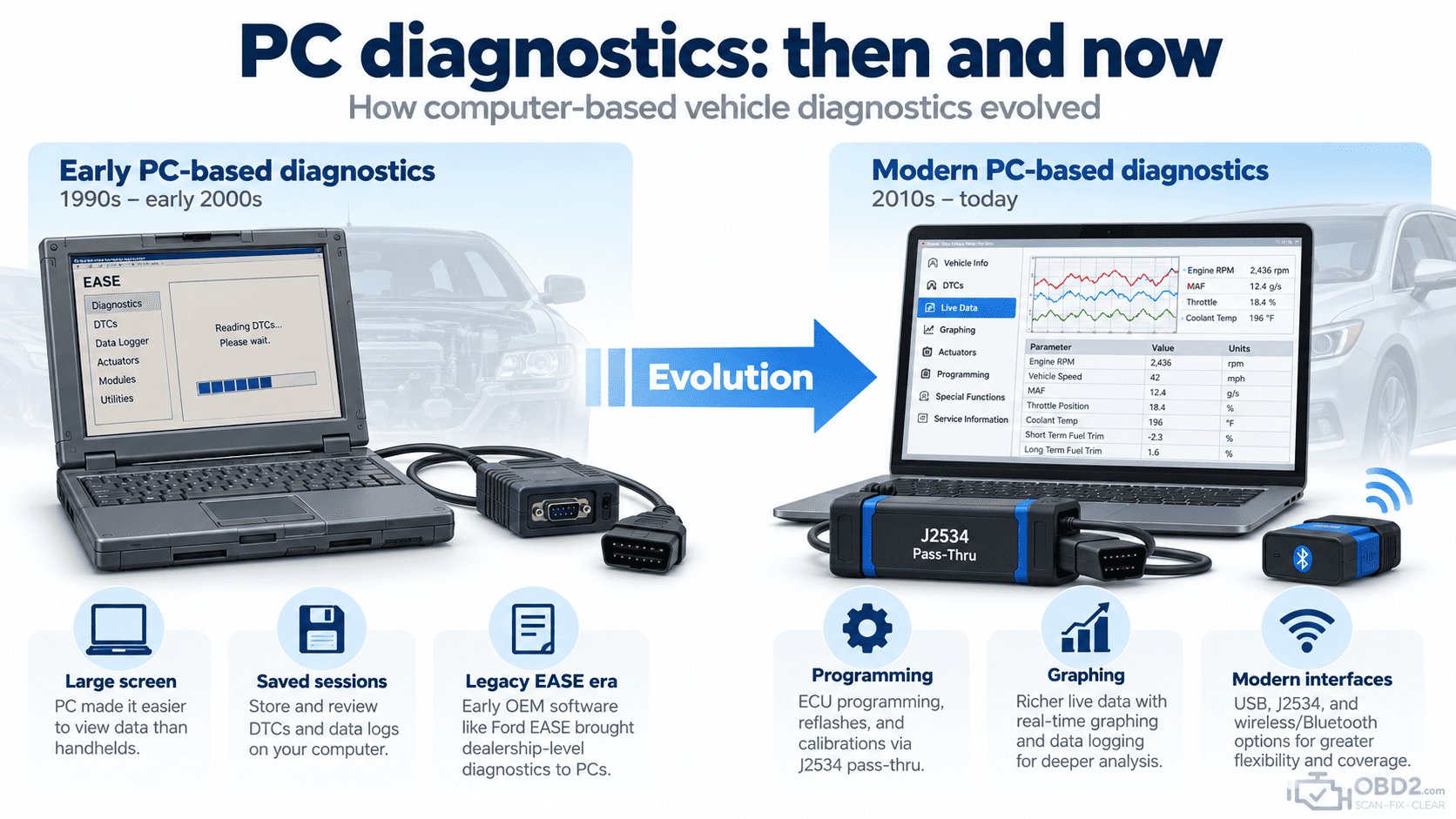
What happened to the old EASE PC scan tools?
OBD2.com has an unusual history in this area.
The domain was historically associated with EASE Simulation / EASE Diagnostics, and many older websites, forum posts, manuals and technical documents still link to EASE resources that were once hosted here.
Those products belonged to an earlier generation of Windows PCs, vehicle interfaces and automotive networks.
This page is therefore not presented as current support for discontinued EASE hardware or software. Its purpose is to preserve the useful diagnostic concepts behind those historical resources and give old incoming links a relevant destination.
You can read more about that background in the history of OBD2.com and EASE Diagnostics.
Where PC diagnostics fit today
The basic idea never disappeared. It simply evolved.
Computer-based vehicle diagnostics are still commonly used for specialist work, manufacturer software, ECU programming and detailed data analysis.
Today, the same broad concept can appear in several forms:
- USB, Bluetooth and Wi-Fi OBD2 interfaces paired with diagnostic software;
- manufacturer-specific PC diagnostic applications;
- J2534 Pass-Thru programming interfaces;
- professional diagnostic platforms that use a Windows laptop or workstation;
- dedicated scanners that now reproduce many of the graphing and recording features once associated mainly with PCs.
For a quick Check Engine Light diagnosis, a phone or handheld scanner is often more convenient. For programming, detailed recording or manufacturer-specific applications, the PC remains an important diagnostic platform.
PC-based OBD2 FAQ
Can I use a Windows laptop as an OBD2 scanner?
Yes. You need compatible diagnostic software and an interface capable of communicating between the computer and the vehicle.
Can a USB cable alone read OBD2?
Normally no. The cable or adapter needs suitable electronics for the vehicle’s diagnostic protocol.
Can PC software display graphs?
Yes. Graphing and recording live data are among the main reasons PC-based diagnosis can still be useful.
Will old OBD2 software work on a modern vehicle?
Not necessarily. Vehicle networks, Windows versions, drivers, security requirements and manufacturer diagnostic systems have changed significantly. Compatibility has to be checked for the exact combination of hardware, software and vehicle.
Can a PC scan tool program an ECU?
Not simply because it runs on a PC. ECU programming requires compatible programming software and hardware, often including manufacturer software and a suitable Pass-Thru interface.
Related guides
For the basic principles, see What is OBD2?. The physical connection is explained in our OBD2 connector and DLC pinout guide.
For programming rather than normal diagnosis, read the J2534 Pass-Thru programming guide. Individual fault codes can be searched in the OBD2 DTC code library, while current diagnostic equipment can be found in our OBD2 diagnostic tools section.
OBD2.com diagnostic history
OBD2.com has been associated with automotive diagnostics since the early OBD-II era. The domain was historically used by EASE Simulation / EASE Diagnostics before beginning a new chapter under independent ownership.
Read the history of OBD2.com and EASE Diagnostics.
