


QuikCode OBD2 code reader: legacy EASE Diagnostics guide
QuikCode OBD II was a diagnostic code-reader product associated with EASE Diagnostics and an earlier version of OBD2.com.
Old automotive forums, workshop discussions and technical documents still contain links to QuikCode software, manuals and product pages that are no longer part of the current site.
Rather than sending those visitors to an unrelated page, this guide explains what QuikCode was designed to do, how a basic OBD2 code reader works and how the same diagnostic tasks are handled with modern tools today.
QuikCode is discussed here for historical and technical reference. The current OBD2.com does not represent this page as active product support for discontinued EASE hardware or software.
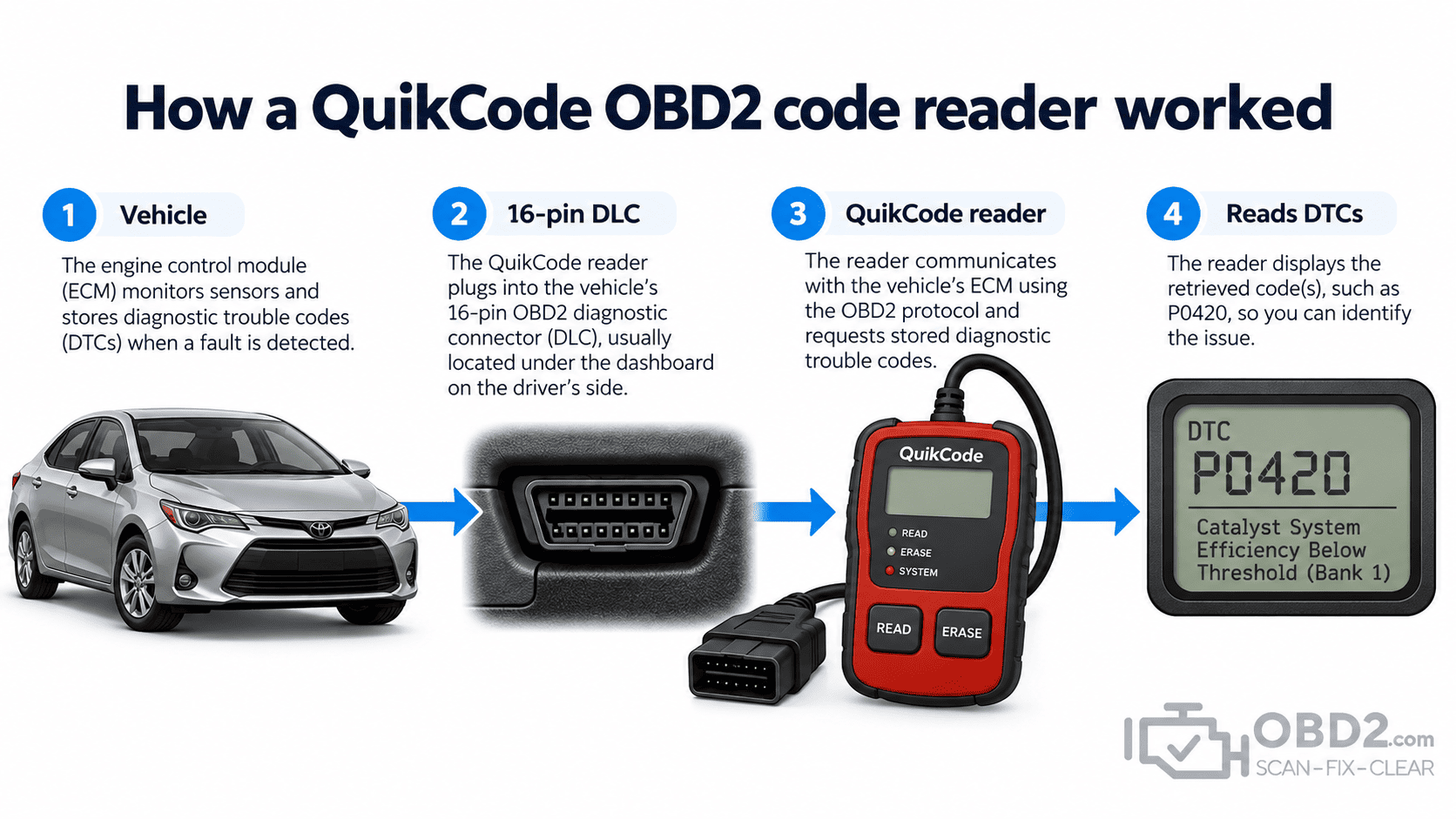
What QuikCode OBD2 was designed to do
QuikCode was built around one of the most useful features introduced by standardized OBD2 diagnostics: retrieving information from the engine management system without needing manufacturer-specific equipment for every vehicle.
A compatible code reader connected through the vehicle’s diagnostic port and requested standardized emissions-related information from the control module.
Depending on the hardware and software version, the useful functions of this type of reader could include:
- reading stored and pending diagnostic trouble codes;
- checking the Check Engine Light and emissions readiness status;
- clearing supported emissions-related diagnostic information;
- displaying basic diagnostic information associated with the fault;
- providing code descriptions where the required database was available.
Compared with modern diagnostic tablets, this sounds limited. At the time, however, the ability to connect to many OBD2-compliant vehicles and retrieve standardized fault information was a major step toward making vehicle diagnostics more accessible outside dealerships.
Understanding the code is only the first step
An OBD2 Diagnostic Trouble Code normally contains five characters, such as P0301, P0420 or U0100.
The first character identifies the broad diagnostic family. P refers to powertrain, B to body, C to chassis and U to network communication.
A basic emissions code reader mainly concentrates on standardized powertrain information, although more advanced modern equipment can communicate with many additional systems.
The important point is that a code is diagnostic information, not a replacement instruction.
For example, a P0420 does not automatically mean that a catalytic converter should be replaced. The code tells you what condition the control module detected. Finding the actual cause may require checking sensor data, wiring, exhaust integrity, fuel control and other information.
You can search individual codes in our OBD2 DTC library.
Generic and manufacturer-specific codes
Some OBD2 trouble codes have standardized meanings across vehicle manufacturers. Others are defined by the manufacturer.
This created an important challenge for older code readers.
A reader might recognize the code number but only provide a detailed description when the correct manufacturer database was installed or supported.
Today, storage capacity makes maintaining large code databases relatively easy. On older diagnostic equipment, memory and software distribution were much more restrictive.
Why pending codes can be useful
A pending code means the vehicle has detected a diagnostic condition but the criteria required to confirm the fault may not yet have been met.
This can be particularly useful with intermittent problems.
Imagine an engine that occasionally misfires for a few seconds but has not yet illuminated the Check Engine Light. A pending code may provide the first indication of what the PCM has started to detect.
That information can disappear from view if the diagnostic memory is cleared before it is properly recorded.
Readiness monitors are part of the diagnostic picture
OBD2 does more than store fault codes. The vehicle also keeps track of whether its emissions self-tests have completed.
These readiness monitors can cover systems such as the catalyst, oxygen sensors, oxygen-sensor heaters, EVAP, EGR, misfire and fuel control.
If codes are cleared or battery power is lost, some monitors may return to a Not Ready state until the vehicle experiences the conditions required to run those tests again.
This matters when diagnosing a vehicle and when preparing for an emissions inspection.
Clearing the check engine light does not fix the fault
A compatible code reader can normally request that supported emissions-related diagnostic information be erased.
When the vehicle accepts that request, the Check Engine Light may switch off.
But nothing about that operation repairs the underlying problem.
If the fault is still present, the PCM can detect it again and store the code again. Clearing codes can also erase useful information and reset readiness monitors.
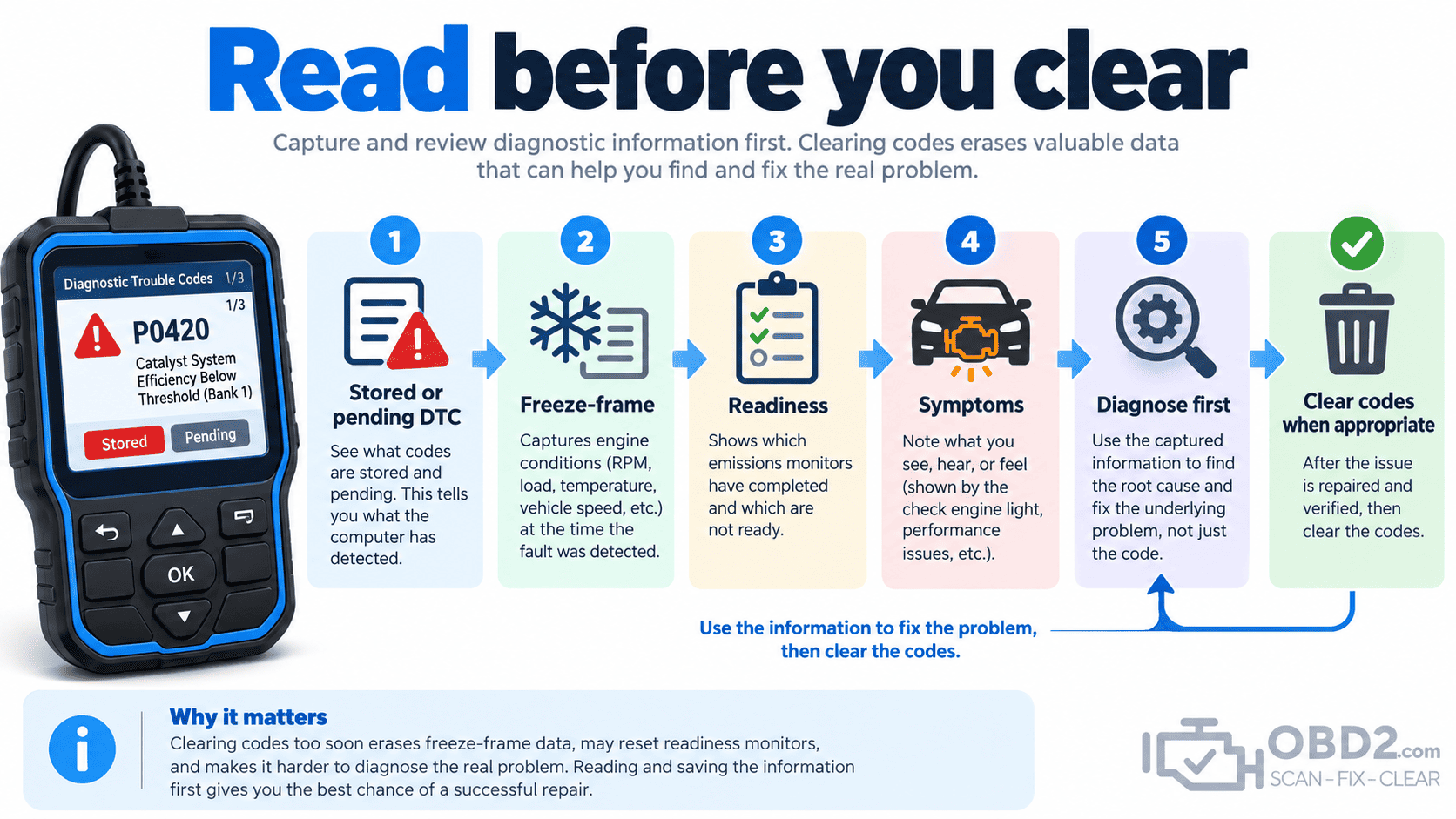
That is why it is better to understand what the vehicle has recorded before pressing Clear.
What to record before clearing a code
Before erasing diagnostic information, it is useful to preserve the clues that may help with the repair:
- the exact DTC and whether it is stored, pending or permanent;
- freeze-frame information when available;
- current readiness-monitor status;
- the symptoms reported by the driver;
- relevant live data before and during the fault.
Even a photograph of the scan-tool screen can be more useful than relying on memory after the diagnostic information has been erased.
Why a basic code reader cannot diagnose every system
The standardized OBD2 functions used by basic code readers were primarily designed around emissions-related diagnostics.
ABS, airbag/SRS, body control, electronic parking brake, transmission and other systems generally require additional manufacturer-specific communication.
This explains why two devices that both plug into the same 16-pin connector can have radically different capabilities.
A simple reader may retrieve the engine code that switched on the Check Engine Light. A more capable multi-system tool may also communicate with dozens of additional modules.
Why old QuikCode links still point to OBD2.com
QuikCode was discussed online during a period when OBD2 diagnostics were becoming much more accessible to independent workshops and vehicle owners.
Some of those forum posts, technical pages and workshop documents remain online decades later.
Because the original QuikCode resources were hosted on earlier versions of OBD2.com, historical links still arrive at this domain today.
This page preserves the subject and context of those citations rather than redirecting them to the homepage or an unrelated product.
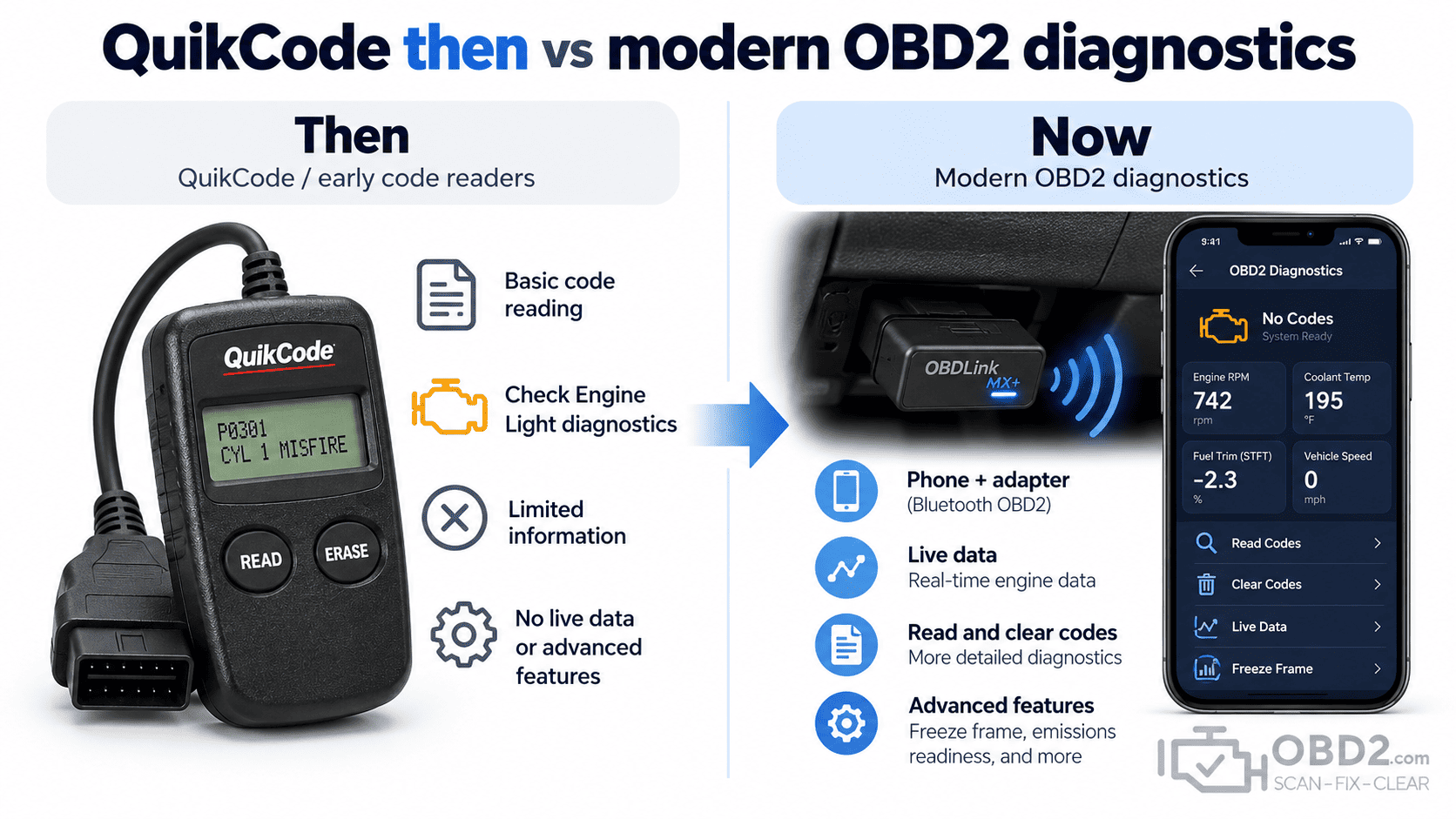
What replaced a legacy code reader like QuikCode?
The core job has not disappeared. The hardware simply became smaller, faster and easier to use.
A modern OBD2 interface can connect a vehicle directly to a smartphone, allowing the phone to become the display, user interface and data-storage device.
For example, our current Bluetooth OBD2 diagnostic adapter follows this modern approach: the interface connects to the vehicle while compatible software on the phone handles reading and displaying diagnostic information.
For a driver who mainly wants to investigate a Check Engine Light, this is much closer to the role once filled by a basic code reader than a large professional diagnostic tablet.
Choosing the right modern diagnostic tool
The useful question today is not simply whether a scanner can “read OBD2.” It is how far you need the diagnosis to go.
Typical levels of capability include:
- basic engine diagnostics for reading and clearing generic Check Engine Light codes;
- live-data diagnostics for viewing sensor information and fuel-control values;
- multi-system diagnostics for ABS, SRS, transmission and other control modules;
- service functions such as maintenance resets or electronic parking-brake procedures;
- advanced diagnostics including active tests, adaptations, coding or manufacturer-specific functions.
A simple Bluetooth interface can therefore be perfectly appropriate for one user while being far too limited for another.
QuikCode and OBD2 FAQ
Is QuikCode still required for older OBD2 vehicles?
No. A modern compatible OBD2 scanner can retrieve standardized diagnostic information from older OBD2-compliant vehicles without requiring the original QuikCode equipment.
Can a code reader tell me which part to replace?
No. A DTC identifies a diagnostic condition. Further testing is usually required to identify the actual cause.
Does clearing codes reset readiness?
Yes. Clearing emissions-related diagnostic information normally resets the relevant non-continuous readiness monitors.
Can any OBD2 scanner access every vehicle module?
No. Generic OBD2 and manufacturer-specific multi-system diagnostics are different levels of vehicle access.
Related guides
For the fundamentals, see What is OBD2? or search a code in our OBD2 DTC code library.
You can also read about PC-based OBD2 scan tools or browse our current OBD2 diagnostic tools.
OBD2.com diagnostic history
OBD2.com has been associated with automotive diagnostics since the early OBD-II era. The domain was historically used by EASE Simulation / EASE Diagnostics before beginning a new chapter under independent ownership.
Read the history of OBD2.com and EASE Diagnostics.
