


GM OBD1 diagnostics: ALDL, trouble codes and scan tools
Diagnosing an older Chevrolet, GMC, Buick, Pontiac, Oldsmobile or Cadillac can be very different from plugging a modern generic OBD2 scanner into the car.
Before OBD2 became standardized, General Motors used several generations of manufacturer-specific diagnostic systems. These older systems are commonly grouped today under the term GM OBD1, although there was no single universal GM OBD1 protocol, connector or scan-tool setup covering every vehicle.
Historical versions of OBD2.com contained information about personal GM OBD-I diagnostic tools. This page replaces those unavailable resources with a practical explanation of ALDL, pre-OBD2 trouble codes, live data and the limitations of modern OBD2 equipment on older GM vehicles.
GM used several diagnostic connectors, controller generations and communication methods before OBD2. Always identify the exact model, year, engine and controller before connecting equipment or interpreting a trouble code.
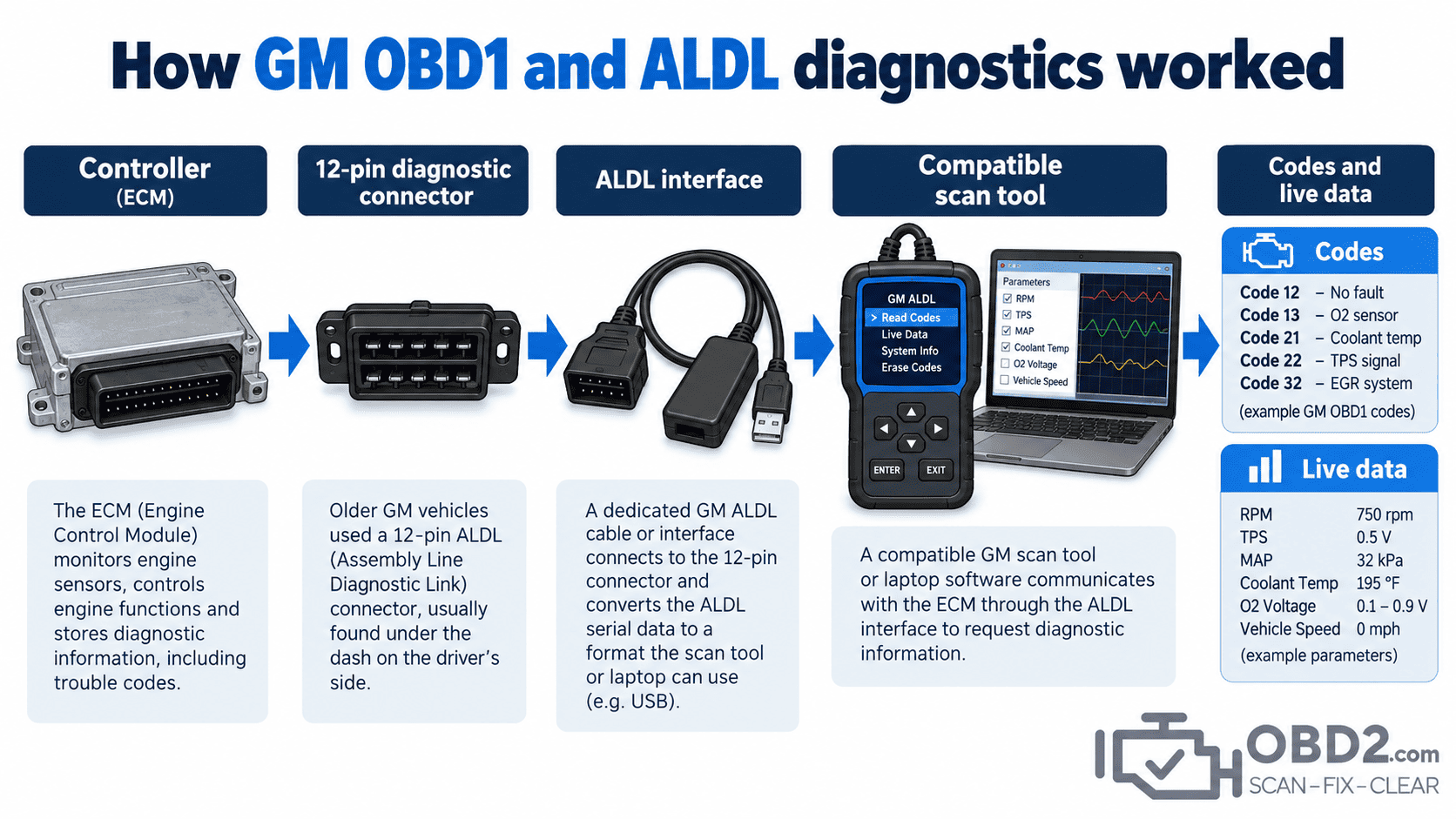
What GM OBD1 actually means
OBD1 is a convenient modern term for the diagnostic systems that existed before standardized OBD2.
Unlike OBD2, manufacturers largely designed their own connectors, data formats, communication speeds and diagnostic procedures.
General Motors therefore developed several diagnostic strategies over the years rather than one single system that remained unchanged from the beginning of electronic engine control until 1996.
This is the first thing to understand when working on an older GM vehicle: two cars can both be described as “GM OBD1” and still require different cables, interfaces or software.
What ALDL is
ALDL is commonly used to describe General Motors’ Assembly Line Diagnostic Link.
It provided a diagnostic connection between compatible service equipment and the vehicle’s electronic controller.
Depending on the particular GM system, a scan tool could retrieve more than just fault codes. It might also display engine sensor values, switch states, fuel-control information, controller identification and certain supported output or actuator tests.
The available data depended heavily on the controller generation and vehicle.
The familiar 12-pin GM connector
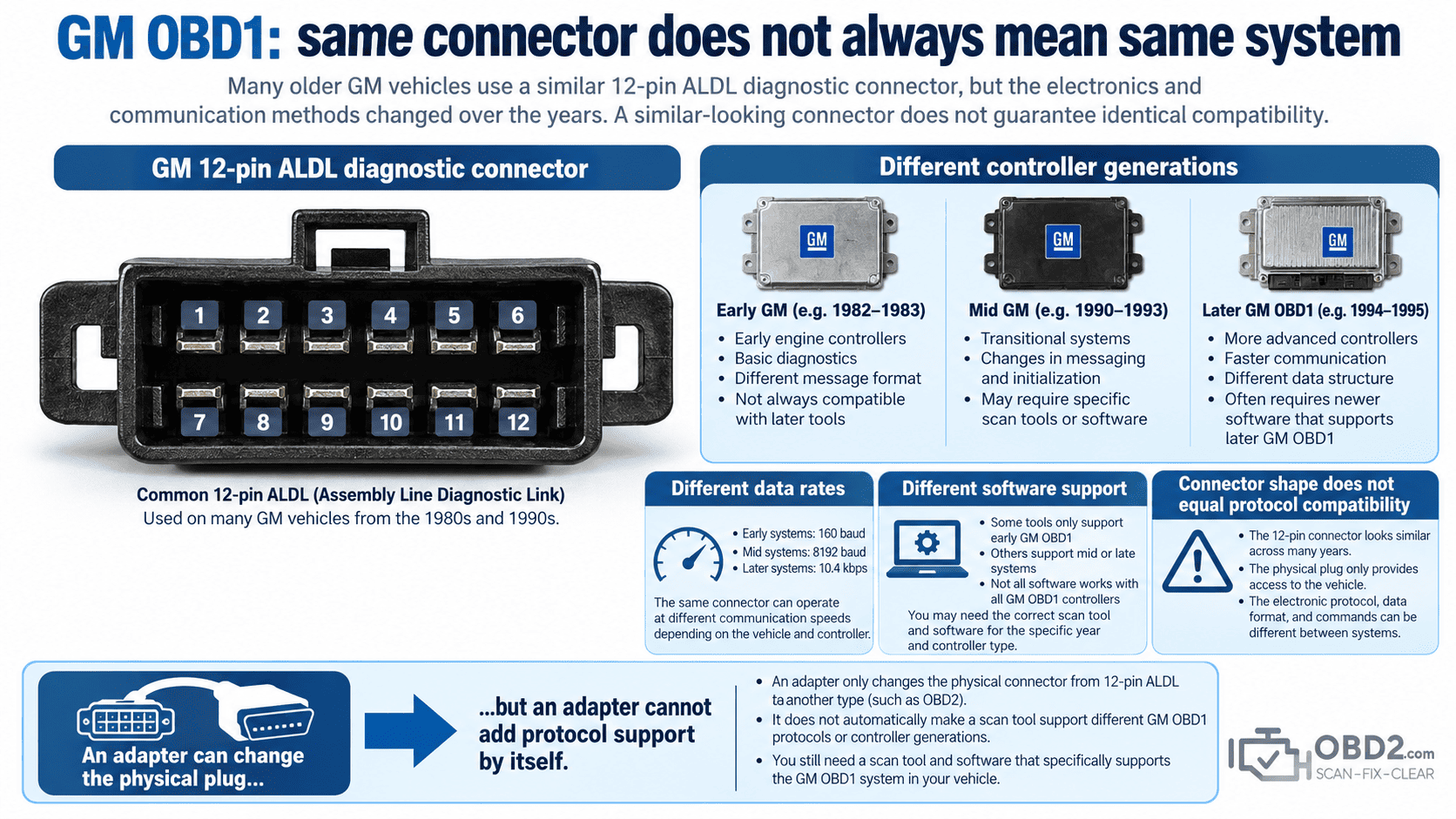
Many older GM vehicles are associated with a rectangular 12-position diagnostic connector.
That connector is one of the most recognizable features of classic GM diagnostics, but its appearance alone does not tell you everything you need to know.
Vehicles using similar-looking connectors could still communicate differently.
This is why buying a 12-pin-to-16-pin adapter does not automatically make a modern OBD2 scanner compatible with the car.
The connector is only the physical connection. The scanner still has to understand the communication method used by the controller.
GM OBD1 did not use one universal protocol
GM diagnostic systems evolved considerably across the pre-OBD2 period.
Communication speeds, controller families and diagnostic capabilities changed from one generation to another.
A diagnostic interface designed for one GM application can therefore fail completely on another vehicle even when the connector looks almost identical.
For that reason, the exact vehicle and controller matter more than the generic label “OBD1.”
Can you read GM OBD1 codes without a scanner?
On certain older GM vehicles, diagnostic trouble codes could be displayed through the Check Engine or Service Engine Soon lamp using a manufacturer-specific procedure.
This is the origin of the familiar “flash code” method associated with some classic GM vehicles.
However, it should not be treated as a universal GM OBD1 procedure.
Whether manual code retrieval is supported, and exactly how it is performed, depends on the vehicle and controller.
A compatible scan tool is generally more useful because a flash sequence can only provide a code number, while a scan tool may also provide live data and other diagnostic information.
Why live data matters on an older GM vehicle
A fault code tells you what the controller has detected. Live data helps you see what the controller is actually seeing.
That distinction is valuable on older vehicles where a sensor or wiring fault may create symptoms without immediately identifying the failed component.
Depending on the system, useful data can include:
- coolant temperature, engine speed and throttle position;
- manifold pressure and vehicle speed;
- oxygen-sensor activity and fuel-control status;
- switch inputs and other controller data supported by the application.
For example, if the controller reports an implausible coolant temperature on a cold engine, that can immediately point diagnosis toward the sensor circuit rather than toward an unrelated mechanical problem.
GM OBD1 and OBD2 are fundamentally different
OBD2 introduced a much higher level of standardization.
A compliant OBD2 vehicle normally provides a standardized 16-pin connector, standardized emissions-related communication, generic DTC formats, common live-data parameters and readiness monitors.
GM OBD1 diagnostics could instead require a vehicle-specific cable, interface, software package and code definition.
This is why a modern generic scanner can communicate with hundreds of OBD2 vehicles but may do nothing when connected to a pre-OBD2 GM vehicle through a simple adapter.
Can a modern OBD2 scanner read GM OBD1?
Not automatically.
The scan tool must explicitly support the older GM diagnostic system.
A physical adapter only changes the connector. It does not add the electronics, timing or software needed to communicate with an ALDL controller.
If a modern professional scanner advertises specific GM OBD1 coverage, it may work when used with the correct cable. A normal generic OBD2 reader should not be assumed to have that capability.
Can an ELM327 read GM OBD1?
A normal ELM327-type interface is designed around supported OBD2 protocols.
It should not be assumed to communicate with older GM ALDL systems.
Specialized interfaces and software do exist for some classic GM applications, but those setups are designed around the particular ALDL implementation rather than generic OBD2 communication.
What a complete GM OBD1 setup needs
Successful communication depends on the entire chain rather than one cable.
- the correct diagnostic connector and pinout;
- a compatible cable or interface for that GM system;
- software or a scan tool that understands the controller;
- the correct vehicle and controller selection;
- stable vehicle power and intact diagnostic wiring.
If any one of those elements is wrong, the scan tool may simply report no communication.
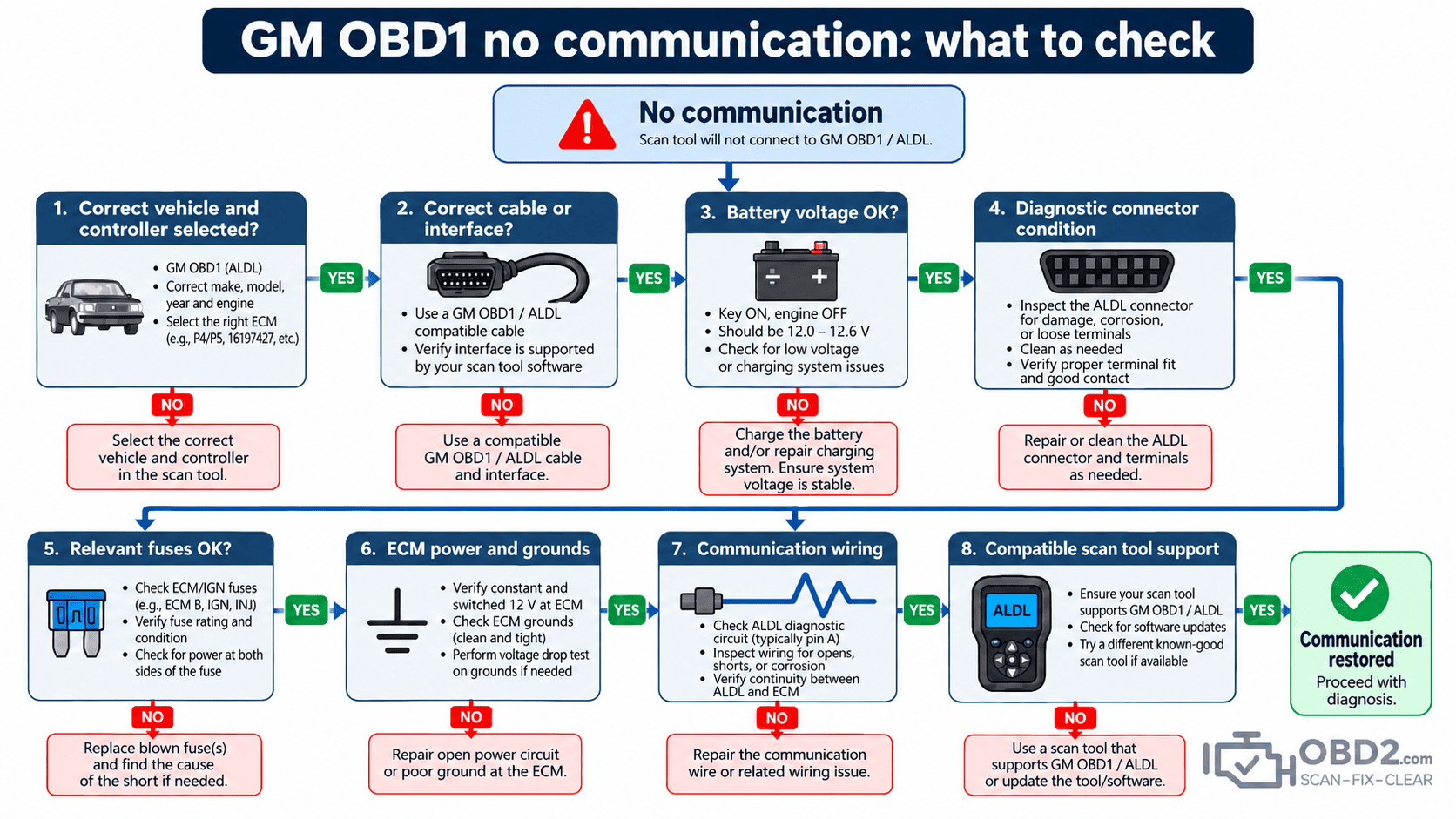
Diagnosing a no-communication problem
If the equipment is known to support the vehicle but the controller still cannot be reached, start with the basics.
Check battery voltage, diagnostic connector condition, relevant fuses, controller power and grounds, and the cable or interface being used.
A scan tool powering up does not prove that the controller is powered or that the communication circuit is intact.
Likewise, replacing the ECU should not be the first response to a communication failure. A missing power supply, poor ground or damaged wire can produce exactly the same symptom.
Older GM codes are not modern P-codes
A pre-OBD2 GM trouble-code number should not automatically be entered into a modern generic OBD2 code list.
The numbering system and definition may belong to an entirely different diagnostic generation.
First identify the vehicle and diagnostic system, then use information appropriate to that controller.
This prevents a common diagnostic mistake: finding a modern code with a similar number and assuming it means the same thing on a vehicle built years before standardized OBD2 existed.
The transition from GM OBD1 to OBD2
Vehicle electronics did not change overnight.
As GM moved toward OBD2, connector designs, control modules and diagnostic strategies evolved over several model years.
Some transitional vehicles may therefore look more modern than earlier OBD1 systems while still requiring manufacturer-specific diagnostic knowledge.
Market, engine, model year and controller information should all be considered when determining which interface is appropriate.
A sensible GM OBD1 diagnostic workflow
- Identify the exact vehicle, engine and controller.
- Determine which diagnostic connector and communication system are present.
- Use a compatible interface and scan tool.
- Retrieve and record all available trouble codes before clearing anything.
- Review live data when the system supports it.
- Test power, grounds and wiring when the diagnostic information points in that direction.
- Follow vehicle-specific diagnostic information for the fault.
- Verify the repair before clearing the final codes.
This approach is slower than blindly replacing parts, but it preserves the information available from the vehicle and reduces the risk of misdiagnosing a decades-old system with modern assumptions.
GM OBD1 FAQ
What does ALDL mean?
ALDL is commonly used for General Motors’ Assembly Line Diagnostic Link, the diagnostic connection used on many older GM electronic control systems.
Did every GM vehicle before 1996 use the same connector?
No. Diagnostic connectors and communication systems varied by vehicle and generation.
Can a 12-pin-to-16-pin adapter convert GM OBD1 into OBD2?
No. It only changes the physical connection. The scan tool still needs to support the original GM communication system.
Can GM OBD1 provide live data?
Many GM controllers can provide diagnostic data when connected to suitable equipment, but the available parameters depend on the controller.
Should I clear an old GM trouble code immediately?
No. Record the code and any available diagnostic information first. Clearing the memory too early can remove useful clues.
Related guides
For the system that followed these older diagnostics, read What is OBD2? and OBD vs OBD2 vs EOBD.
You can also compare this architecture with our Chrysler OBD1 diagnostics guide, read about PC-based diagnostic systems, or search modern standardized codes in the OBD2 DTC library.
OBD2.com diagnostic history
OBD2.com has been associated with automotive diagnostics since the early OBD-II era. The domain was historically used by EASE Simulation / EASE Diagnostics before beginning a new chapter under independent ownership.
Read the history of OBD2.com and EASE Diagnostics.
