


OBD2 diagnostics on Palm OS and PDA scan tools
Long before smartphones became standard workshop tools, mechanics and enthusiasts were already turning handheld computers into portable vehicle scanners.
In the late 1990s and early 2000s, Palm OS PDAs offered something unusual for the time: a compact screen, installable software, local storage and enough computing power to display live vehicle data away from a desktop computer.
Historical versions of OBD2.com documented EASE Diagnostics software designed to connect Palm handhelds to compatible vehicle diagnostic interfaces.
The hardware now looks distinctly vintage, but the underlying idea is surprisingly familiar. A handheld computer ran the diagnostic application, while a separate interface handled communication with the vehicle. Modern Bluetooth OBD2 adapters and smartphone apps follow essentially the same architecture.
The Palm OS software and EASE equipment described on this page are obsolete technologies. This page is preserved as a technical and historical reference and does not imply current support for discontinued EASE products.
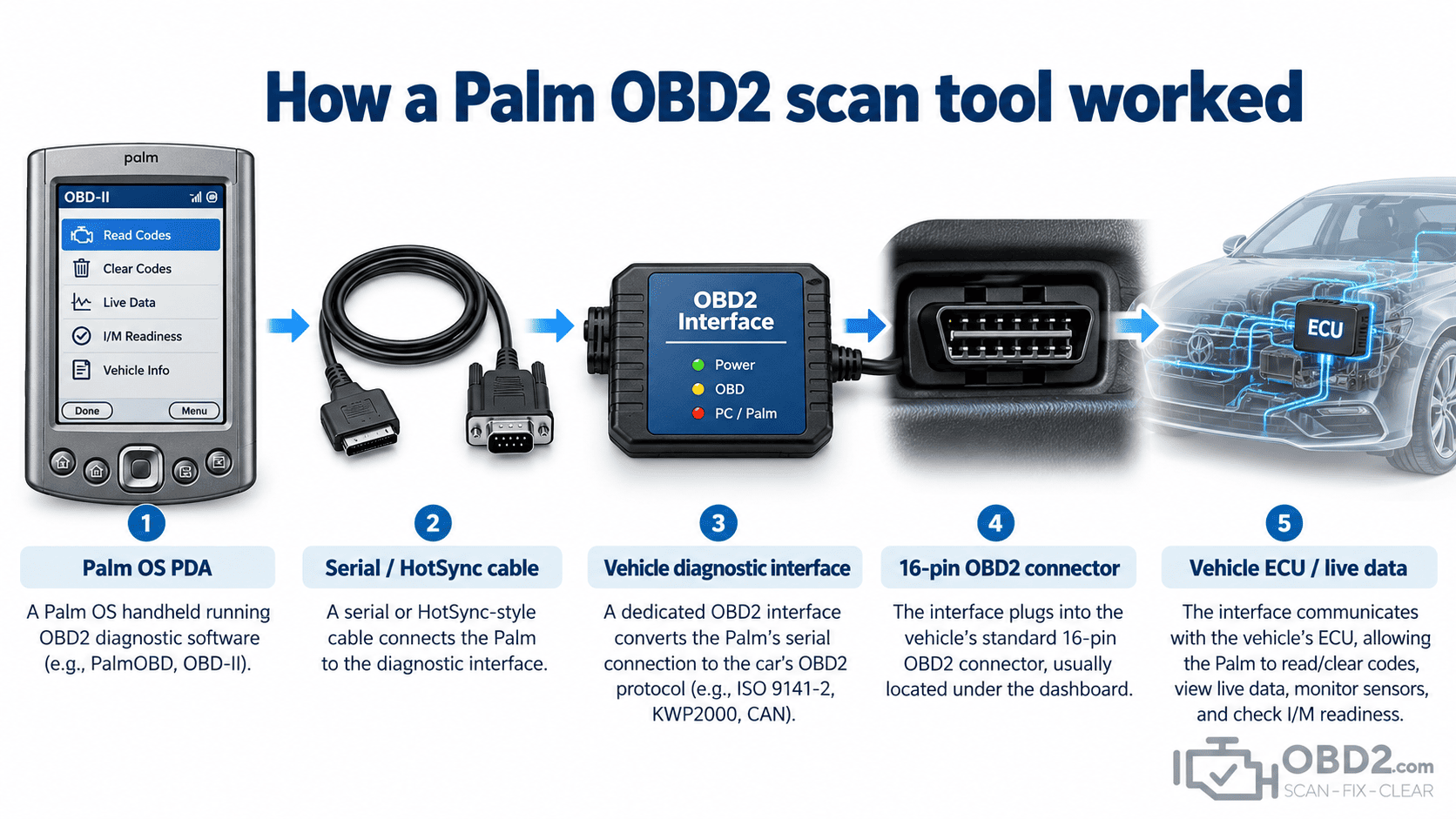
How a Palm OBD2 scan tool worked
The Palm handheld itself was not an OBD2 interface.
Just as a modern smartphone normally requires a Bluetooth or Wi-Fi adapter, the PDA needed dedicated hardware between its serial connection and the vehicle diagnostic network.
A typical setup included:
- a compatible Palm OS handheld running diagnostic software;
- a serial or HotSync connection;
- a dedicated vehicle diagnostic interface;
- a cable connected to the vehicle’s diagnostic connector;
- software and vehicle support appropriate to the diagnostic job.
The diagnostic interface handled the electrical communication with the car and transferred the resulting information to the Palm application.
The operator could then read fault codes, observe supported live parameters and use other diagnostic functions offered by the software.
Why a PDA made sense in a workshop
At the time, the alternative was often either a dedicated handheld scanner or a full-size laptop.
A Palm PDA occupied an interesting middle ground. It was small enough to carry around the workshop or into the vehicle, but unlike a simple code reader it could run software, store information and present menus on a graphical display.
This made it possible to build a diagnostic tool without designing an entire proprietary handheld computer from scratch.
For technicians, that could mean access to live data, fault-code descriptions, stored diagnostic information and software-based functions on a device that was already designed to be portable.
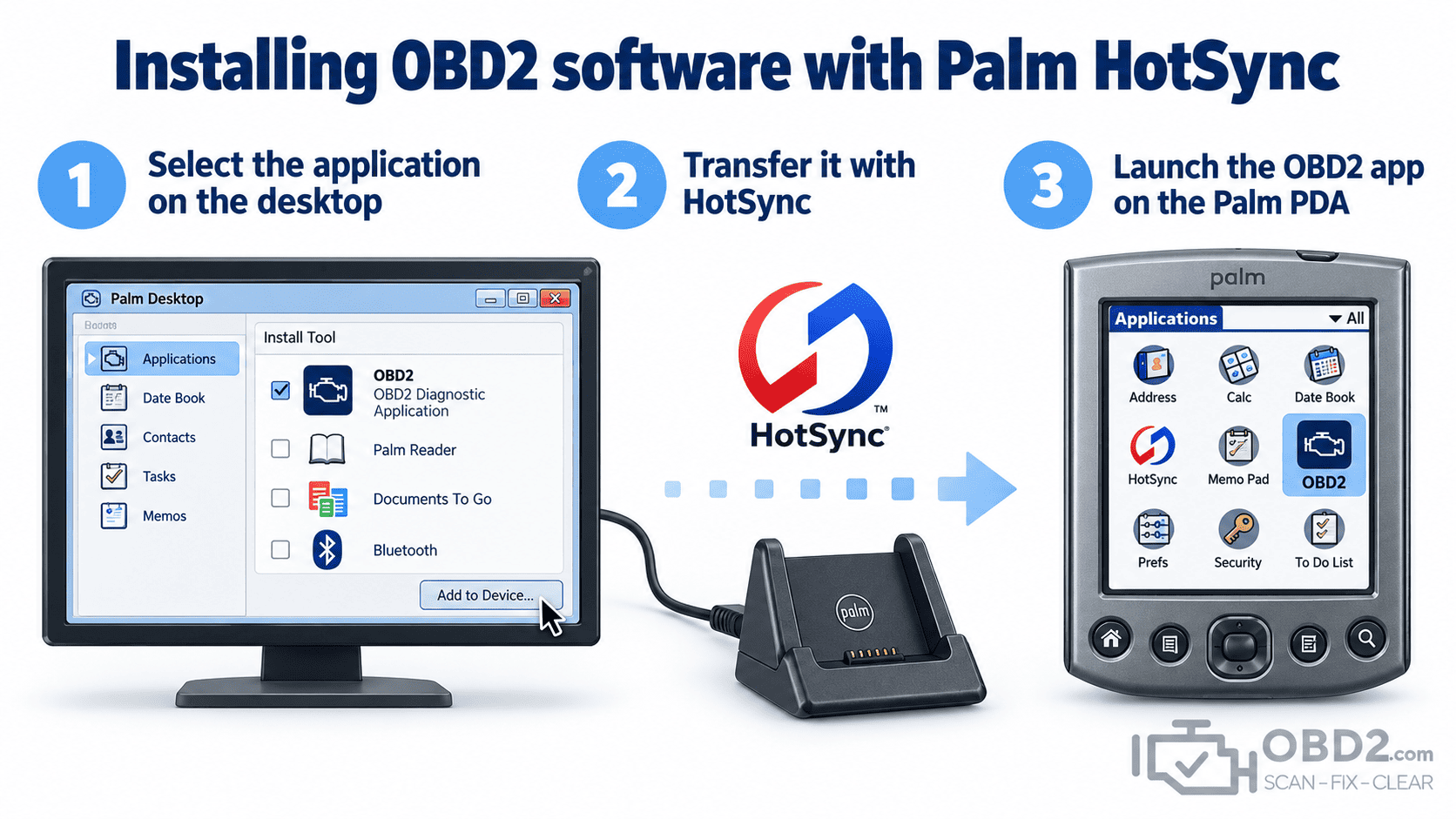
Installing diagnostic software with HotSync
Palm applications were commonly installed from a desktop computer using Palm Desktop and HotSync.
The user selected the required application files on the PC, connected or docked the Palm handheld and transferred the software during synchronization.
This workflow feels unusual today because modern users expect an app store and wireless installation. At the time, however, HotSync was the normal way to install applications and exchange data with a Palm device.
Some diagnostic packages could also use separate manufacturer-specific DTC databases. Rather than installing a large universal database, the user could load only the vehicle information that was actually needed.
Generic OBD2 and enhanced diagnostics
The same distinction that exists with modern scan tools also applied to Palm-based systems.
Generic OBD2 focused on standardized emissions-related information. Depending on the vehicle and application, this could include diagnostic trouble codes, engine RPM, vehicle speed, coolant temperature, fuel trims, oxygen-sensor information and readiness monitor status.
Enhanced diagnostic software could provide additional manufacturer-specific data when both the vehicle interface and the software supported it.
This meant that the Palm itself did not determine the diagnostic capability. The useful functions came from the combination of the handheld, application, interface and supported vehicle protocol.
Why separate DTC databases were useful
Storage space was a real limitation on early handheld computers.
Generic OBD2 fault-code definitions are standardized, but manufacturers also use large numbers of brand-specific codes.
On a modern smartphone, storing thousands of definitions is almost irrelevant from a storage perspective. On an early PDA, every megabyte mattered.
Allowing users to install only the manufacturer-specific databases they needed was therefore a practical design decision rather than an inconvenience.
Hardware compatibility mattered
Not every Palm OS device could automatically run every diagnostic package.
Compatibility could depend on the Palm OS version, available memory, physical connector, serial implementation, diagnostic interface and software release.
That became increasingly complicated as Palm hardware evolved.
Today, preserving one of these systems can require much more than simply finding the original application file. The correct PDA, cables, interface, desktop synchronization software and operating environment may all be needed.
Connecting the Palm to the vehicle
The practical workflow was straightforward once everything was installed.
The technician first connected the Palm to its diagnostic interface, then connected that interface to the vehicle. After switching the ignition to the required position, the Palm diagnostic application could be opened and communication established.
From there, the user could select the required diagnostic functions, such as reading codes or viewing supported live parameters.
The physical vehicle connection was generally the same standardized 16-position connector familiar to OBD2 users today.
For the connector layout and current technical information, see our OBD2 connector and DLC pinout guide.
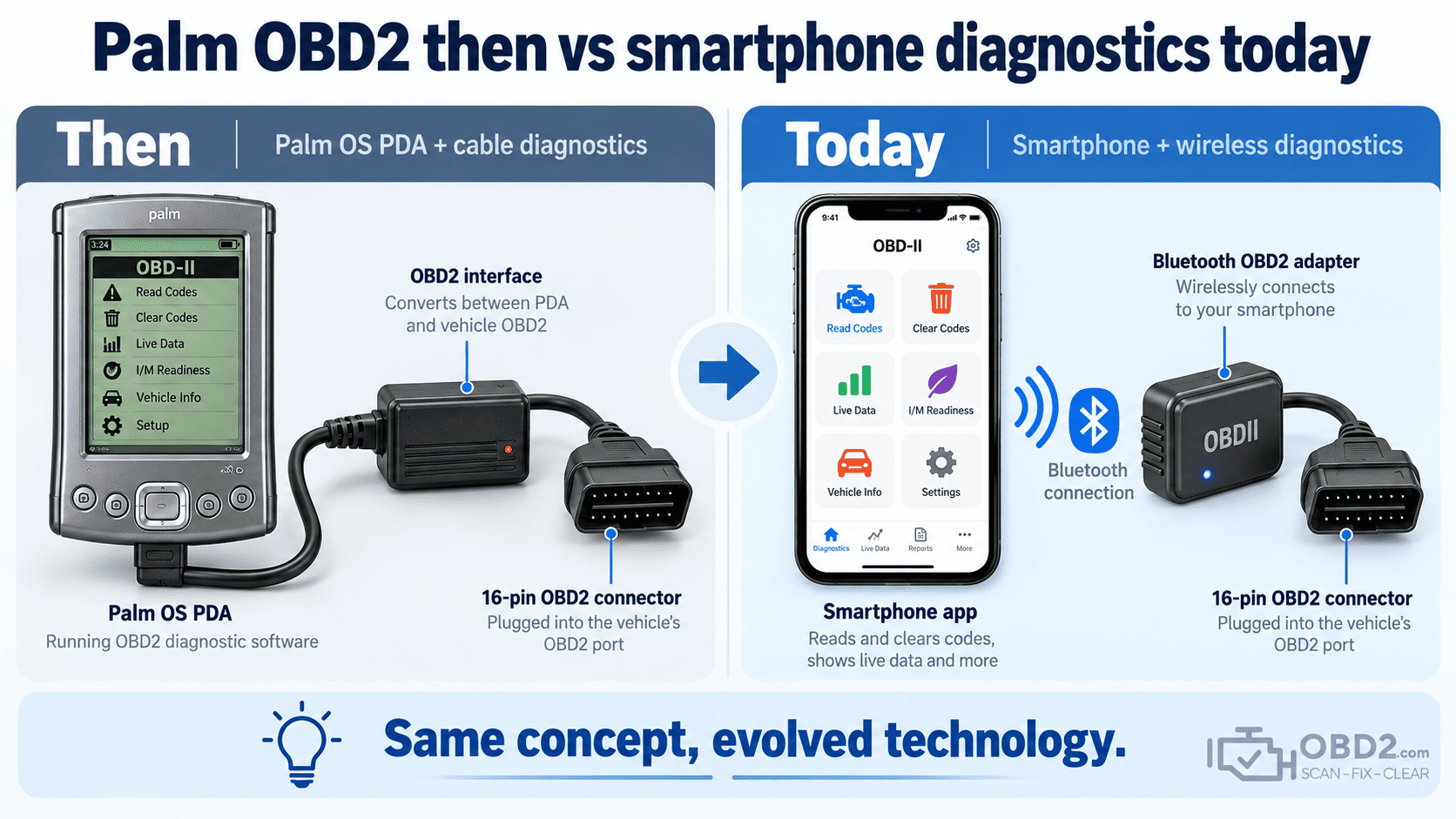
Palm diagnostics and modern smartphone apps are surprisingly similar
The technology changed dramatically, but the architecture did not.
A Palm setup used a handheld computer, diagnostic application and external interface. A modern setup typically uses a smartphone, diagnostic app and Bluetooth, BLE, Wi-Fi or USB adapter.
The differences are mainly in scale and capability.
A modern phone has vastly more processing power, memory, screen resolution and connectivity. It can download updates instantly, synchronize data through the cloud and display complex graphs that would have been difficult on an early PDA.
But conceptually, using a Palm as an OBD2 scanner was already very close to using a phone as one today.
Can old Palm OBD2 equipment still work?
Potentially, yes.
If the original Palm handheld, software, cables and diagnostic interface are still functional, an old system may still communicate with vehicles it was designed to support.
The practical obstacles are now mostly related to age and compatibility:
- degraded PDA batteries and fragile connectors;
- missing serial or HotSync cables;
- obsolete desktop software and drivers;
- lost installation or activation files;
- limited support for newer vehicles and networks.
For normal diagnostic work, preserving such a setup rarely makes economic sense. A modern interface is usually easier to install, more reliable and capable of working with a much wider range of vehicles.
For collectors, historians or technicians trying to recover information from legacy equipment, however, these systems remain an interesting part of automotive diagnostic history.
Why old OBD2.com Palm links still exist
Technical forums, archived workshop documents and old web pages still contain links to Palm resources that were once hosted on OBD2.com.
That is one reason this page exists.
Rather than redirecting every historical URL to the homepage or allowing useful automotive backlinks to terminate on unrelated content, this page provides context for what those old resources actually referred to.
It also preserves a part of the domain’s history: OBD2.com was already publishing information about portable digital vehicle diagnostics years before smartphone scan apps became commonplace.
What replaced Palm-based diagnostic tools?
Palm PDAs did not disappear because the concept failed. The concept was absorbed by more capable hardware.
Today, similar diagnostic workflows can be found in:
- Bluetooth and Wi-Fi OBD2 adapters connected to smartphones;
- tablet-based diagnostic platforms;
- USB interfaces connected to laptops;
- professional handheld scanners with large touchscreens;
- manufacturer-specific software and J2534 programming systems.
The interface is faster, the software is more capable and vehicle communication has become more complex, but the basic idea remains recognizable.
Palm OBD2 FAQ
Could a Palm Pilot really read OBD2 data?
Yes. With compatible software and a suitable vehicle interface, Palm OS handhelds could function as portable OBD2 scan tools.
Did the Palm connect directly to the vehicle?
No. A dedicated diagnostic interface was normally required between the PDA and the vehicle network.
What was HotSync?
HotSync was Palm’s synchronization system for transferring applications and data between a desktop computer and the handheld.
Can old Palm diagnostic software run on an iPhone or Android phone?
Not as a normal modern app. Palm OS applications were written for a different operating system and hardware environment.
What replaced Palm OBD2 scanners?
Smartphones and tablets paired with Bluetooth or Wi-Fi OBD2 adapters largely replaced this type of PDA-based diagnostic setup.
Related guides
For the current basics of vehicle diagnostics, see What is OBD2?. To understand the computer-based systems that developed alongside PDA diagnostics, read our OBD2 PC scan tool software guide.
You can also view the OBD2 connector and DLC pinout guide or search modern fault-code information in our OBD2 DTC code library.
OBD2.com diagnostic history
OBD2.com has been associated with automotive diagnostics since the early OBD-II era. The domain was historically used by EASE Simulation / EASE Diagnostics before beginning a new chapter under independent ownership.
Read the history of OBD2.com and EASE Diagnostics.
