


OBD2 scanner buyer’s guide: how to choose the right diagnostic tool
Choosing an OBD2 scanner is much easier once you stop comparing feature lists and start with one question:
What do you actually want to do on the vehicle?
If your only goal is to understand a Check Engine Light, you do not need the same equipment as someone diagnosing ABS and airbag faults, servicing an electronic parking brake or carrying out active tests on vehicle components.
This guide explains the main levels of automotive diagnostic equipment, from a simple Bluetooth OBD2 adapter to a complete multi-system scanner.
Browse our complete selection of OBD2 diagnostic tools and scanners.
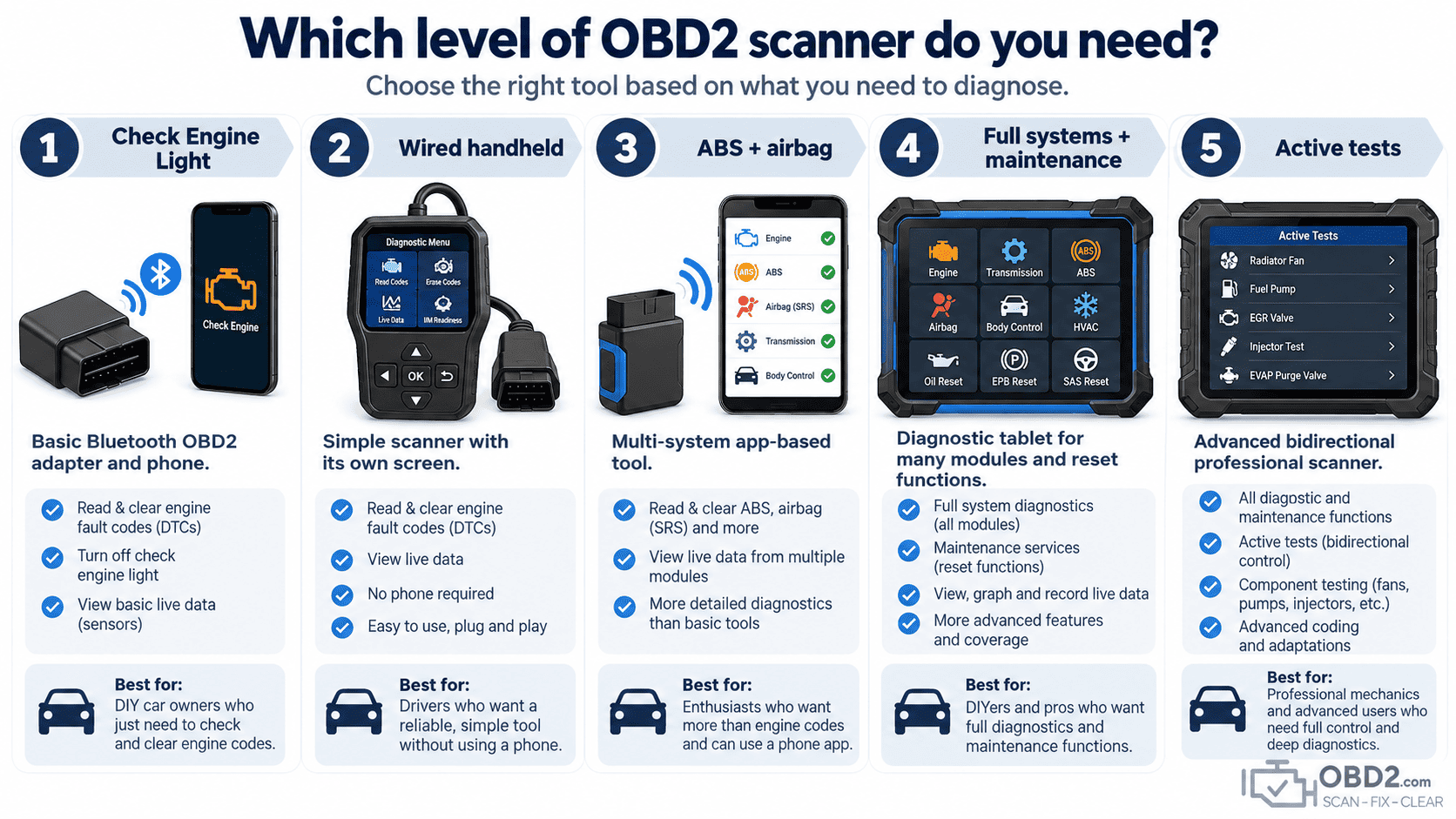
Start with the problem you want to diagnose
A scanner should be chosen for the job you actually intend to perform.
For a Check Engine Light, generic OBD2 access may be all you need. If the warning is for ABS or airbags, generic engine diagnostics are no longer enough. If you maintain several vehicles or work professionally, full-system access, service resets and active tests become much more useful.
This distinction matters because almost every diagnostic device is advertised as “OBD2 compatible,” but that does not mean every device can access the same vehicle systems.
For a check engine light: Bluetooth OBD2
For most drivers who simply want to identify and clear an engine fault code, a quality Bluetooth interface is often the easiest place to start.
The adapter stays small because your smartphone provides the screen, processing power and diagnostic application.
Our Bluetooth 4.0 OBD2 diagnostic adapter is intended for this type of use with compatible iPhone and Android applications.
It is a good choice when your main objectives are reading and clearing Check Engine Light faults, consulting generic engine data and keeping a compact diagnostic interface in the vehicle.
Prefer a tool with its own screen?
Not everyone wants to install an application or use a phone every time a warning light appears.
A wired handheld scanner provides a simpler standalone experience: connect it to the vehicle, switch the ignition on and use the screen built into the tool.
For this type of use, the M317 handheld OBD2 scanner is the straightforward alternative to a Bluetooth adapter.
The diagnostic level is still focused primarily on engine OBD2, but there is no Bluetooth pairing, smartphone or external application to manage.
Need ABS and airbag diagnostics too?
This is the point where a basic generic OBD2 reader reaches its limits.
ABS and SRS/airbag systems use manufacturer-specific diagnostics. A device that can read an engine P-code is therefore not automatically capable of explaining an ABS or airbag warning light.
If you want broader vehicle access while keeping the convenience of an application-based tool, the OBD2 1pro moves into this next level with engine, ABS and airbag diagnostics plus supported service functions.
This category makes much more sense for a user who regularly works on their own vehicles and no longer wants to be limited to the engine ECU.
For full-system diagnostics and maintenance
Once you start working on several systems around the vehicle, a dedicated diagnostic tablet becomes considerably more practical.
A full-system scanner can access many of the control modules installed in the car rather than concentrating only on emissions diagnostics.
Depending on the vehicle, that can include engine, transmission, ABS, airbag, body electronics, instrument cluster, electronic parking brake, steering and other controllers.
Maintenance functions then add another layer. Instead of only identifying faults, the scanner can support workshop procedures such as oil reset, battery-related functions, electronic parking-brake servicing, DPF functions and other vehicle-specific resets or adaptations.
For this type of use, see the Thinktool Mini, positioned as a full-system diagnostic tool with extensive maintenance functions.
When active tests become useful
Reading a fault code tells you what the vehicle detected. An active test lets the diagnostic tool ask a supported component to operate.
This is one of the biggest differences between ordinary diagnostics and more advanced troubleshooting.
For example, rather than only seeing a fault involving an actuator, a bi-directional scanner may be able to command that actuator during diagnosis and help determine whether the problem lies in the component, wiring or control circuit.
If you need this level of capability, the Thinkscan 689 adds full-system diagnostics, maintenance functions, ECU coding capabilities on supported vehicles and bi-directional active tests.
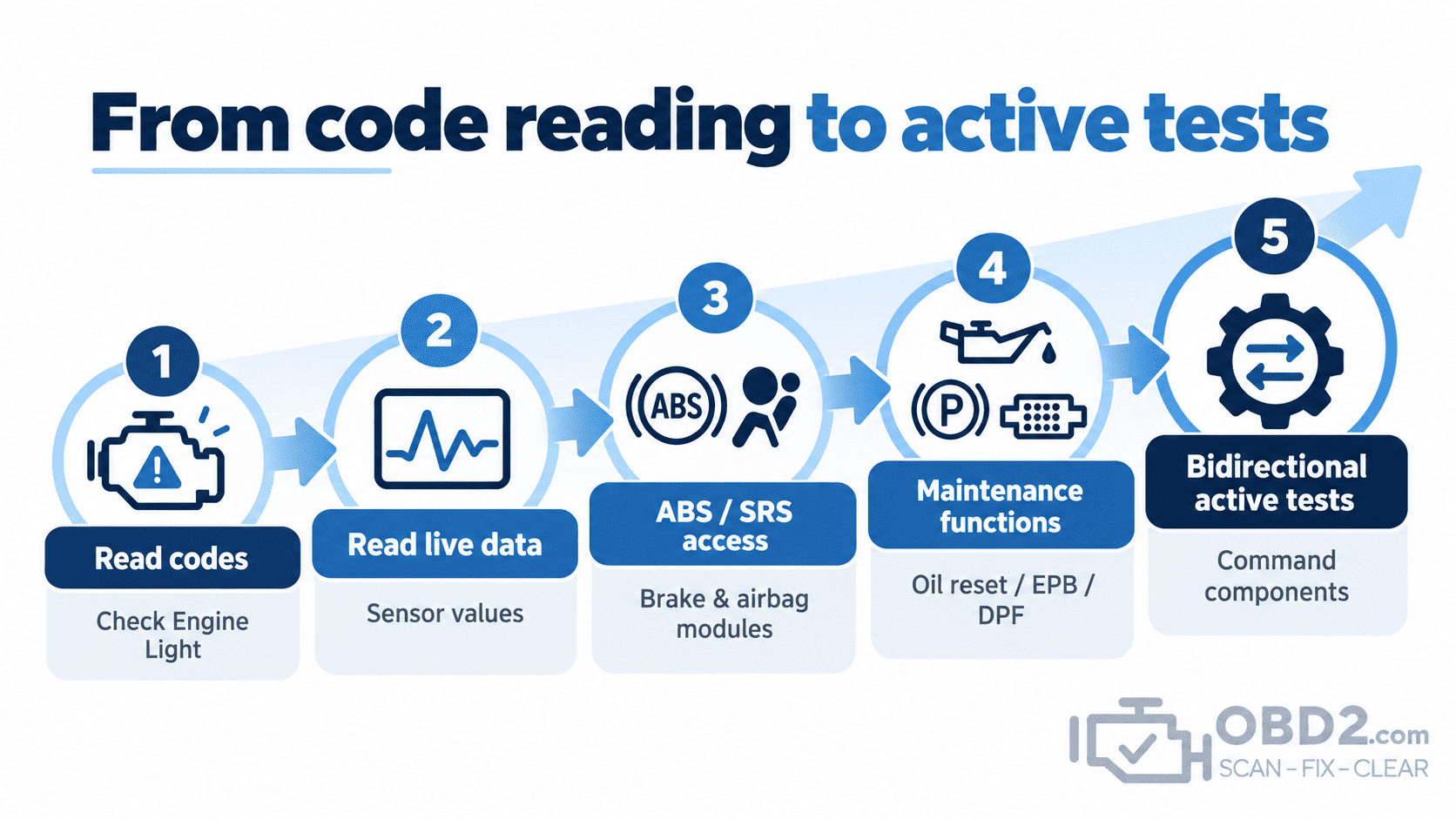
Our scanner range by diagnostic need
| Your main need | Recommended type | Example |
|---|---|---|
| Check Engine Light from a phone | Bluetooth OBD2 interface | Bluetooth 4.0 OBD2 adapter |
| Check Engine Light without a phone | Handheld wired scanner | M317 |
| Engine + ABS + airbag | Multi-system app-based tool | OBD2 1pro |
| Full-system diagnostics + maintenance | Professional diagnostic tablet | Thinktool Mini |
| Full systems + maintenance + active tests | Bi-directional professional scanner | Thinkscan 689 |
If you are still unsure, browse the full diagnostic tools category and compare the level of access required for your vehicle.
Maintenance functions are vehicle-specific
A scanner may advertise many maintenance functions globally, but that does not mean every function is available on every vehicle.
Common examples include oil/service reset, electronic parking-brake service, battery-related procedures, steering-angle calibration, DPF functions, throttle adaptation, injector coding and TPMS-related operations.
The exact support depends on make, model, year, engine and control-module configuration.
This is why compatibility for the specific procedure matters more than the headline number of reset functions.
Coding is not the same as programming
These two terms are frequently confused.
Coding or configuration generally changes supported settings or configuration values inside an existing control module.
Programming or reflashing generally means writing software or calibration data to the module.
A scanner offering coding functions is therefore not automatically capable of reflashing an ECU.
For manufacturer ECU programming, see our J2534 Pass-Thru programming guide.
Vehicle compatibility matters more than the feature count
A diagnostic tool does not perform its functions in isolation. The vehicle has to support the requested operation as well.
Before buying, verify:
- the exact make, model, model year and engine;
- which module you need to access;
- the exact diagnostic or maintenance function required;
- whether the vehicle uses a security gateway or other authorization;
- whether newer protocols such as CAN FD are relevant to that vehicle.
A scanner with a very long global feature list can still be the wrong tool if the one function you need is not supported on your specific vehicle.
Newer vehicles can add more requirements
Recent vehicles increasingly use newer communication networks, gateway modules and diagnostic security.
Hardware support therefore matters as much as software coverage.
A scanner may understand the requested service function but still require appropriate network hardware or authorized security access before the vehicle allows the operation.
This is particularly important when buying equipment specifically for newer cars rather than general OBD2 engine diagnostics.
What about older pre-OBD2 vehicles?
Vehicles built before standardized OBD2 can require manufacturer-specific equipment.
A connector adapter does not automatically convert a modern scanner into an older diagnostic system.
For examples, see our guides to GM OBD1 diagnostics and Chrysler OBD1 diagnostics.
Smartphone adapter or standalone scanner?
A smartphone adapter is compact, inexpensive and perfectly suited to many basic diagnostic jobs.
A standalone tool becomes increasingly useful as the diagnostic level rises because it provides dedicated hardware, broader vehicle access and a workshop-oriented interface.
There is therefore no universal winner.
The Bluetooth adapter is often the better purchase for someone who wants to understand an occasional Check Engine Light. A full-system scanner makes far more sense for someone regularly diagnosing several electronic systems.
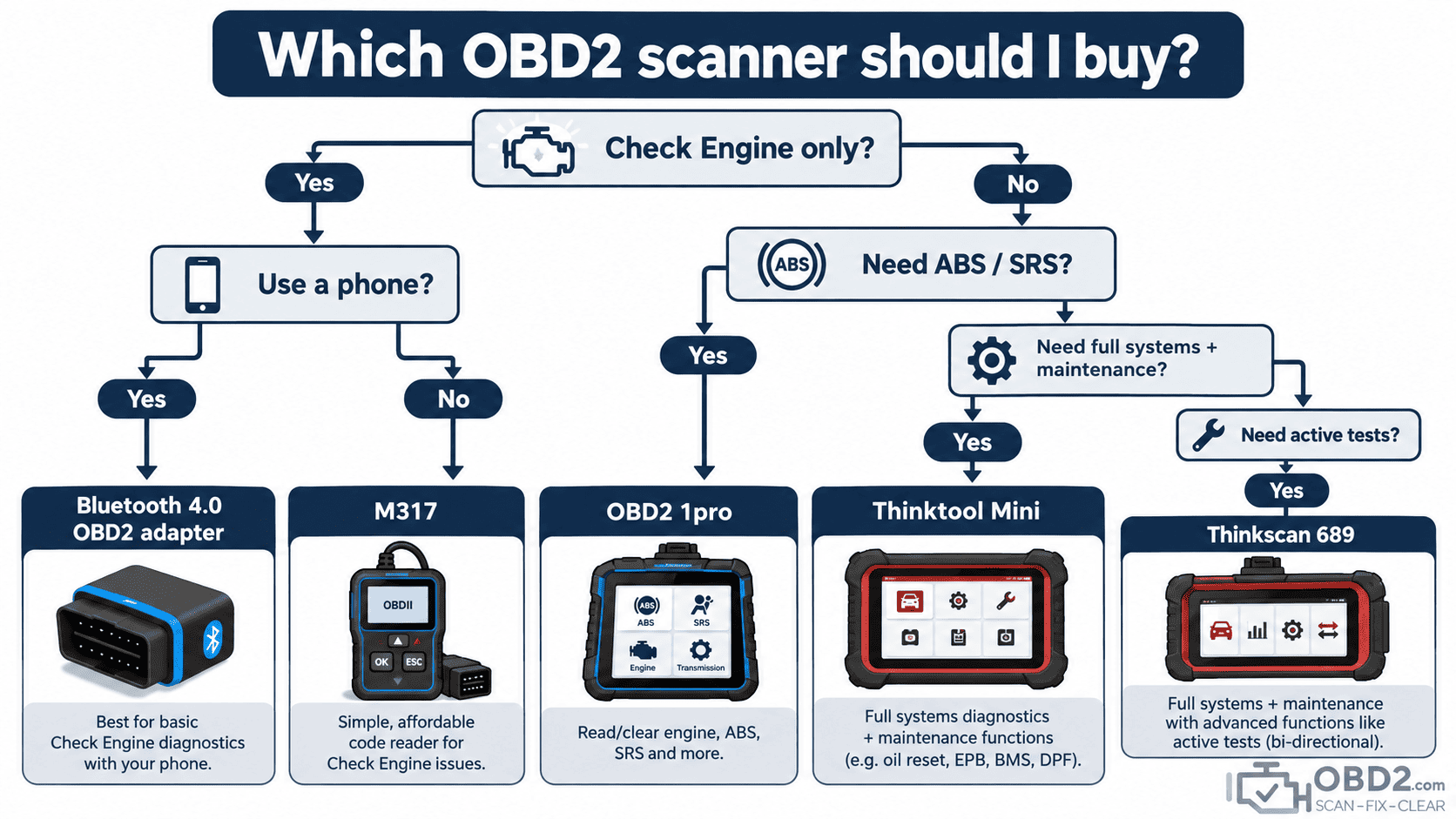
Questions to ask before buying
- What warning light or vehicle system do I need to diagnose?
- Does the scanner support my exact vehicle?
- Do I need engine diagnostics only or ABS, airbag and other modules too?
- Do I need a particular maintenance function?
- Will I benefit from active tests?
- Does the tool use a phone or include its own screen?
- Are updates or subscriptions required?
- Can compatibility for my intended function be checked before purchase?
OBD2 scanner buyer FAQ
Is the cheapest OBD2 scanner enough?
It can be enough if your only objective is basic Check Engine Light diagnosis. More advanced vehicle systems require broader diagnostic coverage.
Can every OBD2 scanner clear ABS and airbag faults?
No. ABS and SRS access is manufacturer-specific and must be supported by the diagnostic tool.
Do I need bi-directional active tests?
Not for basic fault-code reading. Active tests become useful when diagnosing actuators, circuits and more complex vehicle systems.
Can every scanner perform a DPF regeneration?
No. DPF functions depend on the diagnostic tool and the exact vehicle.
Does OBD2 compatibility mean every function works?
No. Standard OBD2 engine diagnostics and manufacturer-specific vehicle diagnostics are different levels of access.
Browse OBD2 diagnostic tools
If you know what level of diagnosis you need, browse our complete OBD2 diagnostic tools and scanners.
For the fundamentals of vehicle diagnostics, see What is OBD2?, the OBD2 connector and DLC pinout guide, or search a fault in our OBD2 DTC code library.
OBD2.com diagnostic history
OBD2.com has been associated with automotive diagnostics since the early OBD-II era. The domain was historically used by EASE Simulation / EASE Diagnostics before beginning a new chapter under independent ownership.
Read the history of OBD2.com and EASE Diagnostics.
