


Ford OBD2 readiness drive cycle: how to set monitors Ready
If your Ford shows one or more OBD2 readiness monitors as Not Ready or Incomplete, it does not necessarily mean that something is broken.
Very often, the Powertrain Control Module simply has not completed all of its emissions self-tests since the last reset. This commonly happens after fault codes are cleared, the battery is disconnected or replaced, the PCM is programmed, or an emissions-related repair is carried out.
The important point is that readiness is not based on mileage alone. Driving 50 or 100 miles will not guarantee that every monitor completes. The PCM is waiting for the correct combination of engine temperature, road speed, load, fuel level, idle time and, in some cases, a cold-soak period.
Ford has used different readiness strategies across models, engines and model years. The procedure below is useful general guidance, but vehicle-specific Ford service information should take priority when available.
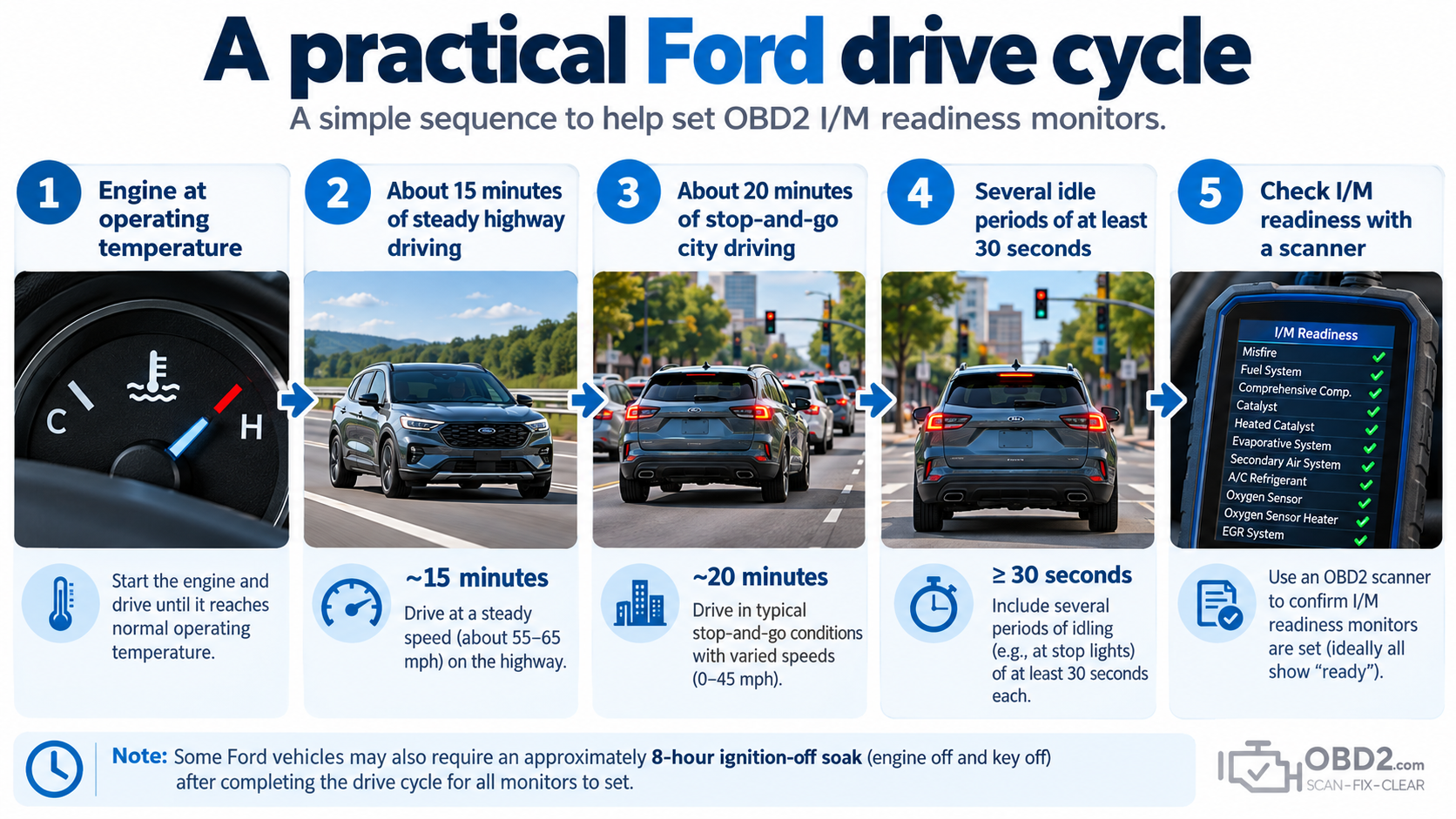
A practical Ford drive cycle
On many Ford vehicles, a useful readiness sequence combines steady highway driving with normal city operation.
- Begin with the vehicle in normal operating condition. Some vehicle-specific procedures require a cold start, while others begin after the engine has warmed.
- Drive at a relatively steady highway or expressway speed for approximately 15 minutes.
- Follow this with approximately 20 minutes of stop-and-go city driving.
- During the city portion, include at least four 30-second idle periods.
- After the drive, connect your scanner and check the I/M Readiness status again.
In the Ford owner-manual procedure referenced below, the vehicle is left with the ignition off for at least 8 hours before the drive cycle. After starting, allow the engine to reach normal operating temperature and do not switch it off until the driving cycle is complete.
If a monitor remains incomplete after a suitable drive, repeating the same journey indefinitely is rarely the best solution. The next step is to identify which monitor has not run and understand what conditions it still needs.
What Ford readiness monitors are checking
Readiness monitors are diagnostic self-tests performed by the PCM to verify that emissions-related systems are operating within expected limits.
Depending on the vehicle, these may include:
- misfire, fuel-system and comprehensive component monitoring;
- catalyst and oxygen-sensor performance;
- oxygen-sensor heater operation;
- EVAP and EGR systems;
- secondary air injection where fitted;
- diesel-specific emissions systems on applicable vehicles.
Some monitors operate continuously while the engine is running. Others are non-continuous and only run when specific conditions are met.
This is why a Ford can drive perfectly normally while one monitor still shows Not Ready.
Why a Ford shows Not Ready
The most common explanation is that readiness information was recently reset.
Clearing DTCs with a scan tool, disconnecting or replacing the battery, allowing the battery to discharge, replacing or programming the PCM, or carrying out certain emissions repairs can all cause the PCM to begin its readiness checks again.
After that reset, the PCM does not simply count miles. It waits for each diagnostic test to see the conditions it requires.
For example, a catalyst monitor may need normal engine temperature and steady cruising, while an EVAP monitor may need an extended key-off period, a particular fuel level and appropriate ambient conditions.
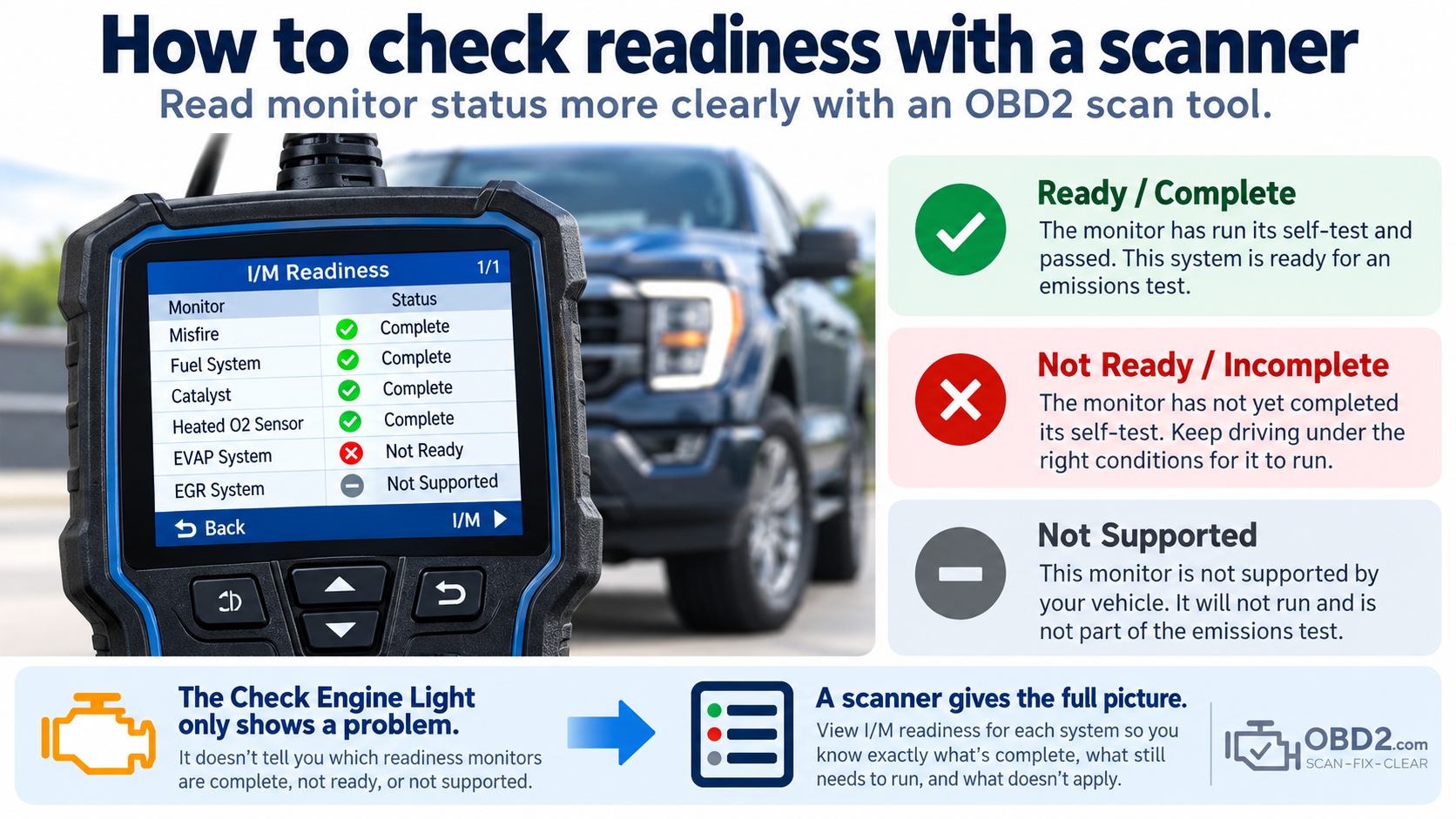
How to check readiness with a scanner
Connect a compatible OBD2 scanner and look for a menu called I/M Readiness, Inspection/Maintenance Readiness, Emissions Readiness or Monitor Status.
Each supported monitor will normally appear as Ready, Complete, Not Ready or Incomplete. A monitor may also appear as Not Supported.
Not Supported is different from Not Ready. It simply means that the vehicle does not use that particular monitor.
The Ford check engine light readiness indication
Some Ford vehicles provide a basic readiness indication through the Malfunction Indicator Lamp.
Ford owner information for certain models instructs the driver to switch the ignition on without starting the engine and observe the Check Engine Light for roughly 15 seconds.
On applicable vehicles, if the Service Engine Soon indicator blinks eight times during this check, the vehicle is not ready for I/M testing. If the indicator remains steadily illuminated, the vehicle is ready for I/M testing.
This method is model-dependent. A scanner remains much more useful because it shows the status of each monitor individually.
Catalyst and oxygen-sensor readiness
The catalyst monitor normally needs the engine to reach normal operating temperature and enter closed-loop fuel control.
The PCM then evaluates catalyst performance using information from the oxygen sensors. Stable road speed and reasonably steady engine load are often important because constantly changing throttle conditions can prevent the PCM from collecting the data it needs.
The oxygen-sensor monitor relies on many of the same basic conditions. Coolant temperature, fuel trims, sensor activity, heater operation and the absence of relevant DTCs can all influence whether the test runs.
An exhaust leak or a sensor that responds abnormally can also prevent the monitor from completing, even if the vehicle remains driveable.
Why the EVAP monitor can take longer
EVAP is often the last monitor to become Ready because some of its enabling conditions cannot be created simply by driving farther.
The PCM may need an extended ignition-off soak, an appropriate fuel level, suitable ambient temperature, a true cold start and normal purge and vent operation.
Repeated short trips can therefore leave EVAP incomplete for days.
A nearly empty or completely full tank can also prevent EVAP testing on some Ford vehicles. The exact limits vary by application, so vehicle-specific information matters if this is the only monitor that refuses to complete.
Why an 8-hour soak can matter
An overnight or extended key-off period gives the vehicle time to reach conditions that normal continuous driving cannot provide.
Coolant and intake-air temperatures can move closer to ambient temperature, EVAP pressure can stabilize and cold-start criteria can become available to the PCM.
This is why another hour of highway driving may accomplish nothing when the test you are waiting for actually needs the vehicle to sit overnight.
Older Ford drive-cycle procedures
Some older Ford owner and service information used more detailed drive traces. These could combine warm-up, idle periods, moderate acceleration toward approximately 45 mph, steady-speed cruising, city driving and several stops.
Those procedures were written for particular generations of Ford powertrains. They should not automatically be applied to every later vehicle simply because the badge on the hood says Ford.
This is also a good reason to be cautious with generic “Ford drive cycle” instructions found online. The basic principles remain useful, but the exact enabling conditions can differ substantially by model and year.
There is no magic mileage
A Ford can travel 100 miles and still have an incomplete monitor.
Another vehicle may complete several monitors within one well-structured trip.
The difference is not the odometer. It is whether the PCM encountered the operating conditions required to run the tests.
Highway driving can help with some monitors. City driving and idle periods help with others. EVAP or cold-start tests may require the vehicle to spend several hours switched off.
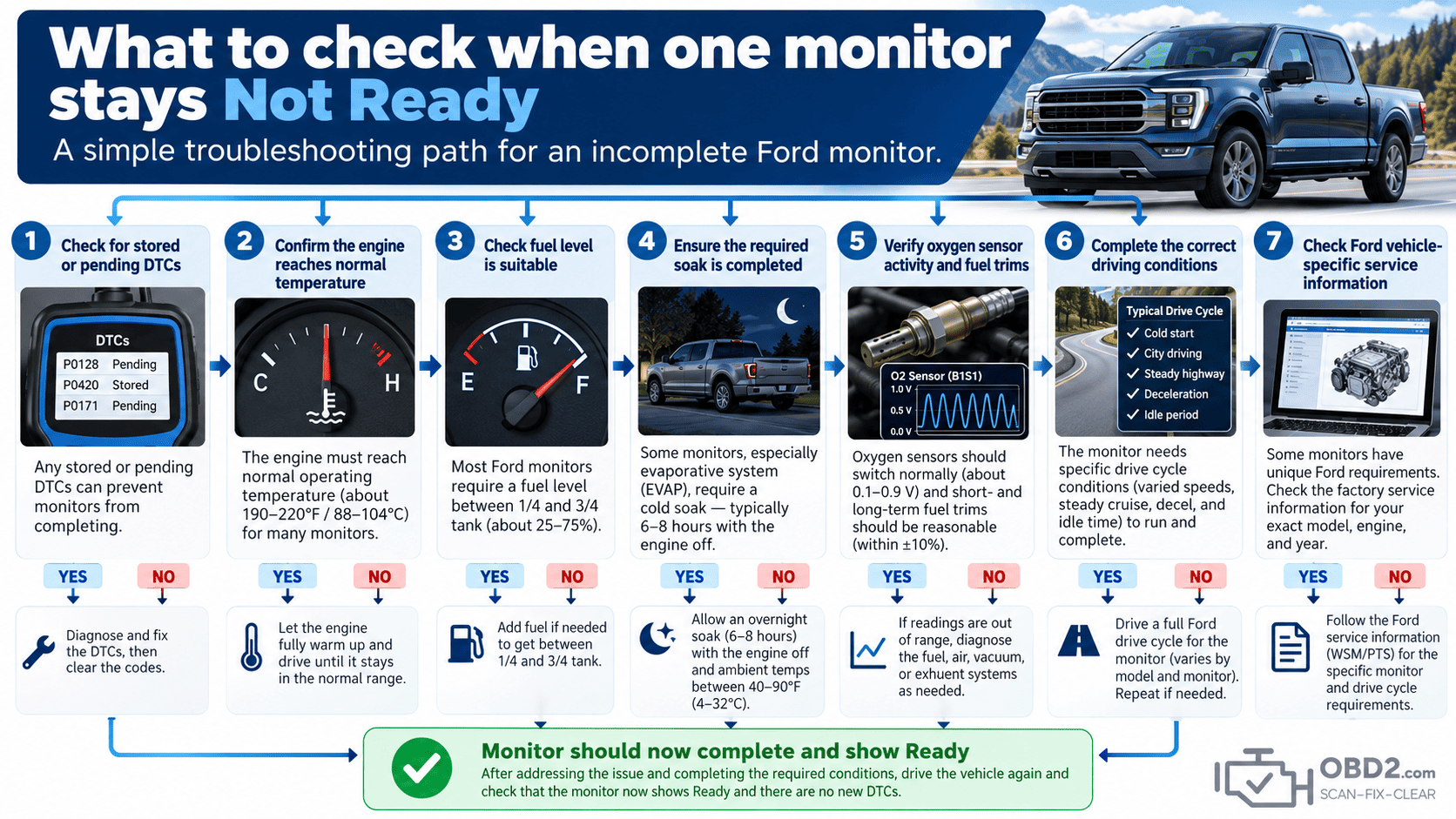
What to check when one monitor stays Not Ready
If the same monitor remains incomplete after several appropriate trips, stop treating the problem as a mileage issue.
Check the information that could prevent the test from running:
- stored and pending DTCs;
- coolant temperature and thermostat operation;
- fuel level and EVAP-system condition;
- oxygen-sensor activity and fuel trims;
- battery voltage and relevant communication faults;
- vehicle-specific enabling criteria for the incomplete monitor.
A thermostat is a good example. If the engine runs slightly too cool, the vehicle may appear completely normal from the driver’s seat while the PCM never sees the temperature required to run a particular monitor.
Can a bad thermostat prevent readiness?
Yes.
If the engine never reaches or maintains the temperature expected by the PCM, some non-continuous monitors may not run.
This can happen without an obvious drivability complaint. Looking at coolant temperature through live data is therefore much more useful than continuing to drive without checking what the PCM actually sees.
Clearing codes resets the process
Clearing emissions-related DTCs normally resets readiness information.
Battery disconnection can have the same effect.
If a fault has been repaired, clear the codes when appropriate and then allow the vehicle to complete its self-tests. Repeatedly erasing codes while checking readiness simply sends the process back to the beginning.
Do not clear codes immediately before an emissions test
Clearing the Check Engine Light just before an inspection can create a different problem: the warning may disappear, but several monitors may now show Not Ready.
The correct approach is to repair the fault, clear the diagnostic information when appropriate, complete enough driving for the PCM to run its self-tests, and then verify readiness before the inspection.
What an OBD2 scanner can help you check
A scanner cannot simply force a monitor to Ready. The PCM has to run and pass the diagnostic test itself.
What a scanner can do is show you the information needed to understand why the test has not run:
- which monitors are still incomplete;
- whether pending or stored DTCs are present;
- coolant temperature and other live data;
- short- and long-term fuel trims;
- oxygen-sensor information;
- when a monitor finally changes to Ready.
Ford readiness FAQ
How many miles does a Ford need after clearing codes?
There is no fixed mileage. Readiness depends on driving, temperature, load, soak and other enabling conditions.
Why is EVAP still Not Ready?
EVAP may be waiting for the correct fuel level, ambient temperature, cold-start conditions or an extended ignition-off soak.
Can I pass inspection with one monitor Not Ready?
Inspection rules vary by jurisdiction, vehicle year and fuel type. Check the requirements that apply where the vehicle will be inspected.
Will highway driving complete Ford monitors?
It can help several monitors, but others may also require city driving, idle periods, cold starts or an extended soak.
Does disconnecting the Ford battery reset readiness?
It can. After battery power is lost, the PCM may need to perform its emissions self-tests again.
What should I do if readiness never completes?
Identify the incomplete monitor, check stored and pending DTCs, inspect the relevant live data and use Ford service information for the exact vehicle instead of continuing to drive indefinitely.
Related OBD2 guides
For the basics of vehicle diagnostics, see What is OBD2?. For connector information, see our OBD2 connector and DLC pinout guide.
You can also search individual faults in the OBD2 DTC code library, compare this procedure with the Chrysler, Dodge & Jeep readiness drive cycle, or read our Ford PATS key programming and relearn guide.
Ford technical reference
Ford — Readiness for Inspection/Maintenance Testing
Ford has used different OBD2 monitor strategies over many generations. When a specific monitor refuses to complete, use service information for the exact model year, engine and powertrain rather than assuming that one universal drive cycle applies to every Ford.
